
 Hi there! Welcome to my blog. My name is Ivan. I am a Dutch IT Professional working as Principal IT Consultant.
 In my previous post I created a USB installation disk with the Windows 7 USB DVD Download Tool. Now I am going to use the USB flash disk drive to install my systems. I also can use this media to install my virtual machines. VMWare Workstation 6.5 or lower does not support to boot from USB removable disks, but there is a workaround to achieve that.
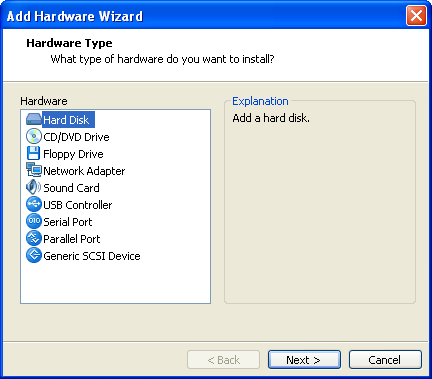
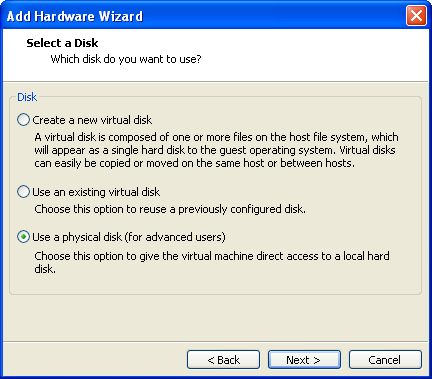
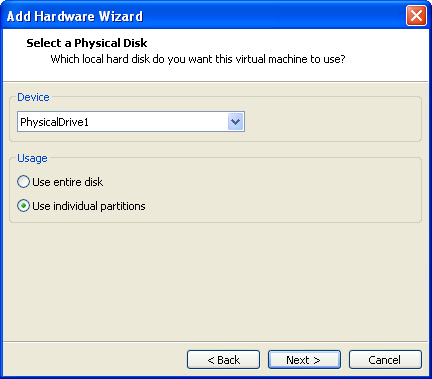
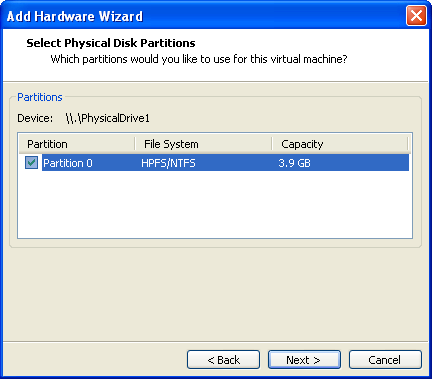
Start VMWare Workstation and open the properties of your VM; then create new virtual harddisk and use the physical partition of the inserted USB disk. In following screenshots you can see how I did to get it done:
Add Hardware Wizard and add Hard Disk
Select “Use a physical disk“
Select the USB flash drive device “PhysicalDrive1” and “Use individual partitions“
Select the partition.
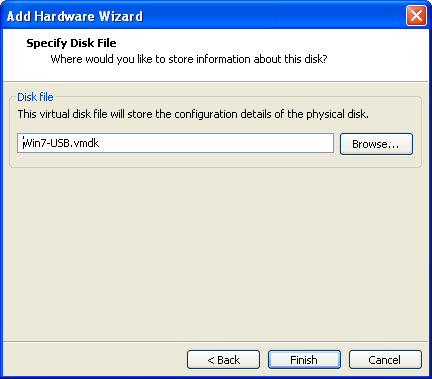
Specify the Disk File and Finish the configuration of the virtual disk
Install Windows 7
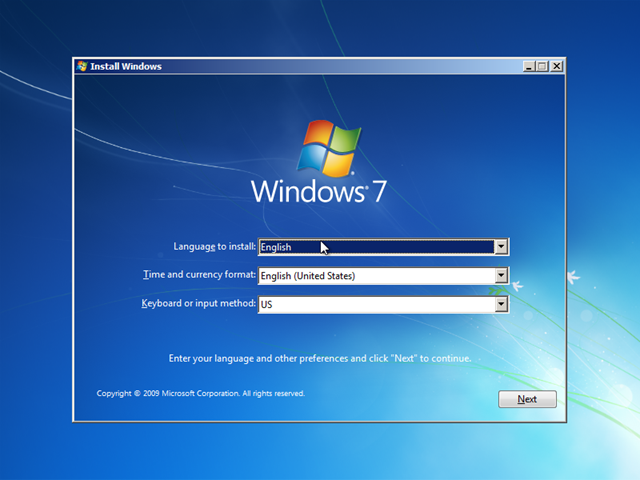
Select the language options
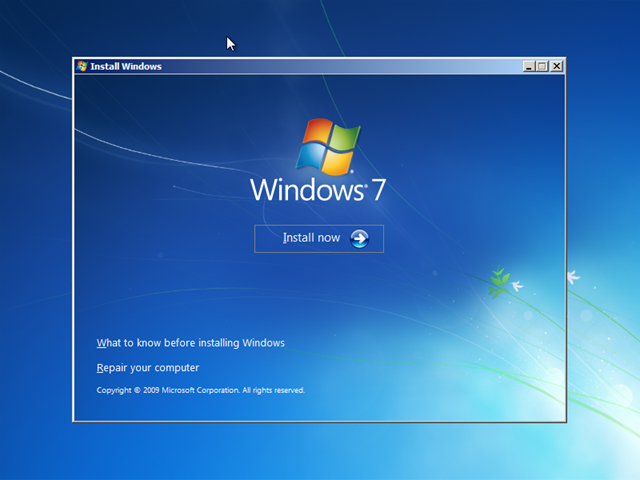
Install now
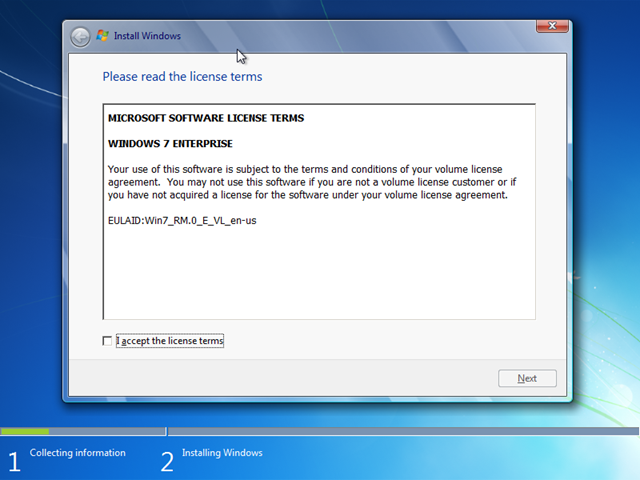
Accept the license terms
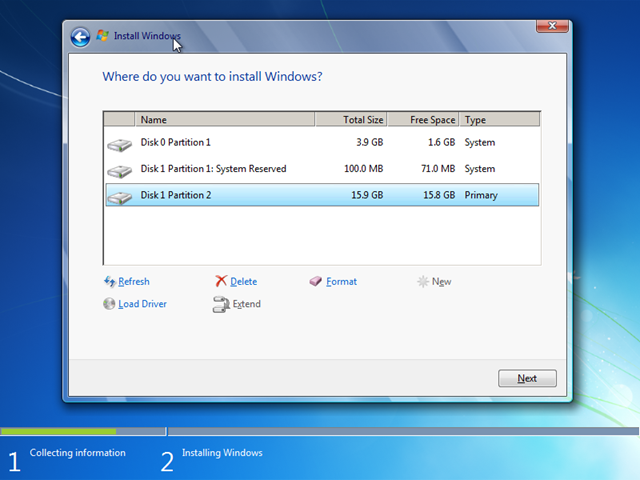
Make sure that right partition is selected
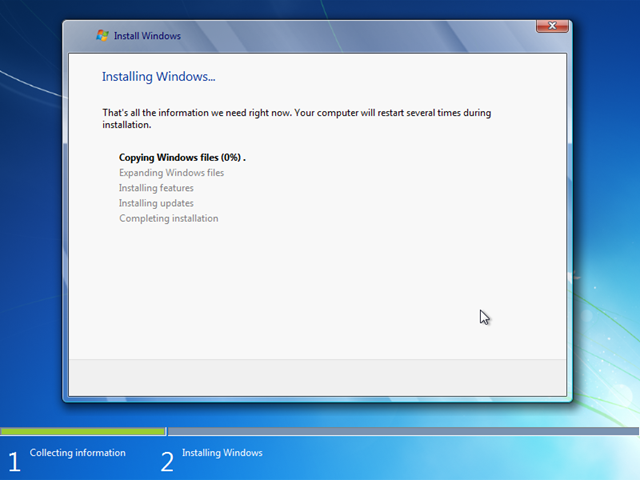
The installation of Windows 7 will start.
Thanks to VMWare Workstation I was able to use the new USB flash drive media to install Windows 7. Burning ISO images to CD/DVD is becoming less popular. I like using the USB flash/disk drives more and more.
Related posts
-
VMWare: How to migrate or backup small scale vCenter database?
VMWare vCenter Server requires a sql database engine to store it’s data. During the vCenter installation there is an option to choose a “Microsoft SQL Server 2005 Express” instance for small scale deployments. I have installed the local SQL engine on my vCenter virtual machine and now I want to migrate... -
VMWare: how to upgrade from ESXi 4.0 to 4.1?
I am running several VMWare ESXi4 servers and I wanted to upgrade them to the latest release of ESXi4.1. The following steps I used to achieve this job in less than 5 minutes. Please make sure you installed vSpere CLI and download the upgrade package on you system before you... -
VMWare: how to install Windows 7 from USB media on VMWare Workstation?
In my previous post I created a USB installation disk with the Windows 7 USB DVD Download Tool. Now I am going to use the USB flash disk drive to install my systems. I also can use this media to install my virtual machines. VMWare Workstation 6.5 or lower does... -
VMWare: why upgrade to VMWare Workstation 7?
VMWare has updated their client virtualization platform and released the VMWare Workstation 7 release. Why upgrade to VMWare Workstation 7? Why Choose VMware Workstation? Check out this cool video from the VMWare site. The wow experience with the latest release. The guys from VMWare did a great job! The... -
VMWare: Failed to start VMware VirtualCenter Server service?
My Openfiler iSCSI SAN failed and all virtual machines on my Virtual Center Server needed to be reboot. After reboot the “VMWare VirtualCenter Server” service failed to start showing the following error message: I opened Windows Explorer, browsed to to C:\Documents and Settings\All Users\Application Data\VMware\VMware VirtualCenter\Logs and opened latest vpxd-XX.log log... -
VMWare: how to set static MAC address ESX?
Last week I planned to migrate some virtual machines running on a VMWare Server 1.x Windows host to aVMWare ESX 3.5i host. One of the vm’s is running as license server and the registration key was registered by using the MAC of the network interface. I had to keep the... -
VMWare ESX: Blue screen during installation of Windows XP
If you try to install Windows XP virtual machine on a VMWare ESX host you will receive the following error blue screen during the Setup phase. Make sure you download the SCSI LSI Logic driver. Restart the setup; run F6 and load the SCSI drivers. With the lastest versions of... -
VMWare ESX: Virtual Hard Disk FULL
Recently I was working to move a virtual machine test network to production. Before bringing this virtual machine into production I wanted to run the latest updates and during that process my virtual hard disk become full. When I created this virtual machine I configured the initial disk space 6GB.... -
VMware Workstation 6.04 linux x64 unrecoverable error
I am running Ubuntu 8.04 LTS Desktop Edition 64bit edition and after I installed VMWare Workstation 6.04 Linux x64 edition I got the following error when trying to start my virtual machines sitting on a NTFS USB disk volume. VMware Workstation unrecoverable error: (vcpu-0)Failed to allocate page for guest RAM!A... -
Cisco: how to configure multiple ports on a switch as trunk?
If you are managing Cisco network equipment and switches in particular then you should be aware of the following feature. This feature can save you a lot of time when configuring Cisco switches. In my example I configured 20 ports to be as trunk in a lab environment. Switch1#conf t...


EBM
Didn’t work. FUBAR to the MAX.
Ivan Versluis
Dear EBM,
Which steps doesn’t work out for you? Please provide me some more details so I can have a look myself.
Most important step is that you have a working Windows 7 USB installation disk working before starting to work on VMware. Make sure the USB disk is formatted from Windows7 and partition on the USB drive is set to active. Copy all files from the Windows 7 ISO/DVD and paste them on the USB drive.
Boot your pc from USB and make sure this new flash drive is working.
If that is working go to VMWare and repeat my steps. Make sure the flash drive is inserted and when choosing a physical drive the right partition is selected.
Ivan
EBM
Dear Ivan,
I apologize for my somewhat terse & well…ignorant remark above. As it turns out, I “missed” or rather ignored your advice to use the 7 USB/DVD Download Tool. I’ve attempted to use it to create a Win 8 Developer Preview DVD & install it (8) on workstation 8, but have gotten the dreaded “A required CD/DVD device driver is missing” error with using 4 different ISO’s DLD’d direct from MS, using 3 different burning tools (Native 7 w/ the DVD/USB tool, Nero Burn Rom 11 Trial ver & ImgBurn) at varying speeds…SHAH 1’s check out, etc… In other words the failure was not due to a corrupt ISO dl and/or DVD burn…none of which were successful, though each ISO I used installed FLAWLESSLY in Workstation 8.
Not being able to find an answer on the net (all canned responses saying due to corrupt dl/burn) lead to my frustration, which lead to my ignorant comment. I will attempt this with the 7 USB/DVD tool & report back on my success/failure.
Many thanks for your prompt attention & courteous reply, I was pleasantly surprised to receive such given the date of your OP (2 years ago)
Thank you once again.
“EBM”
EBM
A thought suddenly occured…Is this method supported in Workstation 8 and/or Player 4?
Ivan Versluis
Hi EBM,
You are welcome. While reading your second reply couple of times I am still not sure if the USB media disk has been setup properly.
Please let me ask some more questions:
– What do you want to achieve?
My reason of writing this post is that I could use my USB flash drive I created to stage physical systems with the new Windows 7 OS at that time. Now I have customized Windows PE boot image where I can install and test my deployment process with help of VMWare Workstation.
– I learned you are using the Windows 8 preview to install that with USB? I am not sure if the Win7 Download tool is compatible with Win8. (Correction there is another post here talking about this http://www.redmondpie.com/how-to-make-windows-8-bootable-usb-flash-drive-the-easy-way/)
– I am using VMWare Workstation 6.5. I don’t see there is a problem if you are using a new VMWare Workstation 8 version. Even it could support boot from USB. Not sure but I can imagine VMWare development has continued since that time.
Before even touching VMWare Workstation please make sure the USB installation drive is working on a physical system.
I have some time in the upcoming week so I may give it a try myself and update this post.
EBM
Hello Ivan,
Thank you for following up. I will attempt to clarify what it is I wish to accomplish, while doing so as briefly as possible.
Let me start out by stating that I am not an IT pro, my skillset is that of an upper above average-lower advanced HOME user. What I initially set out to do is actually a process that is no longer *officially* supported by MS as of Windows 7–that is the process of slipstreaming the installation media to include SP’s updates, etc. I have successfully created, tested and deployed a “Vanilla” SP1 slipstreamed install DVD using a 3rd party tool–RT Seven Lite Config Tool: http://www.rt7lite.com/rt-se7en-lite-forum/listcat.html
Installing from USB was not what I originally set out to do, what I was trying to accomplish–and have successfully done so since my last post– was to create an updated DVD with Post SP1 Updates, Hotfixes & IE 9 integrated. I encountered the aforementioned “driver is missing” error on several attempts to test install via DVD on VMwware & I only made mention of Windows 8 because I encountered the same error EVERY time I tried to install via DVD using the Win 7 USB/DVD Tool & EVERY attempt to install via ISO was successful on both 7 & 8—which lead me to the false impression that the 7 USB/DVD tool was at “fault”. I have since learned that my question posed on my third post “Is this method supported in Workstation 8 and/or Player 4?” was the real “culprit” …enabling legacy emulation in Advanced CD/DVD serttings led to a successful install via DVD without a hitch, and booting to the physical harddrive on my computer successfully opened the installation GUI (is that what it’s called?)
The USB boot issue is moot as it appears my laptop does not support USB FDD boot. I did use the 7 tool to format & copy onto an 8gb flash drive, it shows as healthy, active & primary in disk mgmt. Booting to the BIOS showed “USB FDD:” listed under the boot tab, but nothing on the “right side” & quite frankly having told you I am just an average user, the whole BIOS thing is a bit out of my league and changing anything much more than the boot order is intimidating to me LOL.
Thank you again for your attention to this, and again I apologize for my rather rude comment .
Regards
EBM
EBM
…Disregard my comment re: “my laptop does not support USB FDD boot” rookie mistake by me, thought “FDD”= Flash Disk Drive, it’s actually FLOPPY disk drive.
I have successfully created a Win 7 VM via USB boot/install using your instructions, thank you. The Post SP 1 updates, hotfixes & IE 9 all integrated successfully also, fwiw.
Regards
“EBM”
Bleeksel
Hi Ivan,
Thanks for the post, it really helped me a lot!
I found a similar way is to add a new CD/DVD drive instead of a HDD drive. Be sure to have the first CD point to a WinPE iso, the second one to your self built installation .iso, which can be an .iso located on the host harddrive. Once WinPE is started, the WinPE drive is d:\, and the second CD/DVD drive is e:\. Just type e:\ at the command prompt, and then setup.exe. At setup, the only possible drive to install to is the virtual disk of the virtual machine.
It saves some time creating a USB device. Ofcouse this is only interesting if you are not planning to install on other host machines.
Congrats with your baby!
Bleeksel
Bleeksel
And by the way: you don’t need to worry about making any drive bootable…
shilpa jacob
i am a user of windows8…now i wanna install windows7 inside win8 using vmware….somebody please help me
jg
i tried this with vmware workstation 12, followed every step to the end, new system powered up without any problem, until I removed the 2nd hard disk – the physically mapped usb drive – from the system, then it couldn't find the bootdisk anymore.
is there a way to fix this?
thanks.
jg
o clarify how i removed the 2nd hard disk. i powered off the guest OS first, then removed the 2nd disk, then power on to firmware and ensure the installed disk was the first one to boot, finally booted it up again, but it couldn't find the boot disk.
tried this three times but still no fix 🙁
sony
nice work thank Ivan
Seguis
Work BRO, work, THX, THX, THX *-* WORKKKKKK
Geometry Dash 2.1 speed hack for mac
For many people, troubleshooting computer issues is mysterious and
confusing. If you are looking to get a machine that helps you
handle complex graphics and design tasks,
then you can never make a mistake with the Apple Mac
Pro one. 0 GHz Intel Core 2 Duo processor provides fast processing speed (said to be
half a dozen times superior to its predecessors) and the impressive graphics card that may be the NVidia Ge –
Force 128MB caters relatively well to accelerate the gaming experience and for graphics-intensive work.