
 Hi there! Welcome to my blog. My name is Ivan. I am a Dutch IT Professional working as Principal IT Consultant.
 I have created a virtual machine which was installed within a German OU in Active Directory. This OU has special configuration for location and keyboard layout. I want to change the default keyboard layout from German to English when I login on the system. My keyboard layout is English (QWERTY) and the German uses QWERTZ with different characters.
Windows XP logo with DE keyboard flag
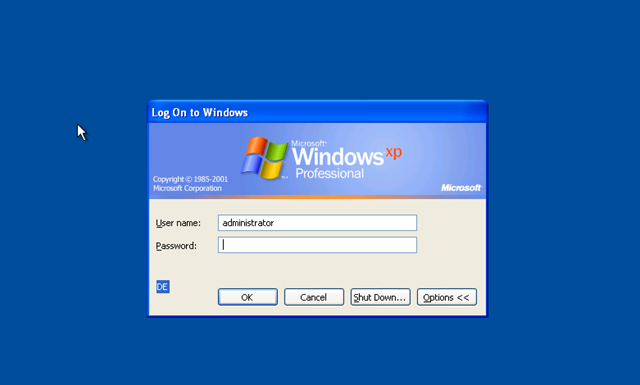
To do that, login as Administrator and start RegEdit.exe. Browse then to:
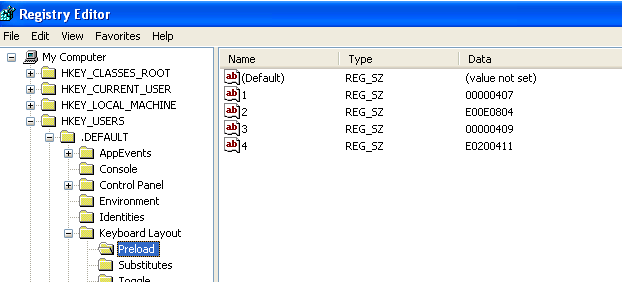
HKEY_USERS\.DEFAULT\Keyboard Layout\Preload
Change REG_SZ names 1 to the Keyboard layout you need. I needed to have this Default in English (EN) instead of German (DE).
- “1”=”00000407″ ==> English
- “2”=”00000409″ ==> German
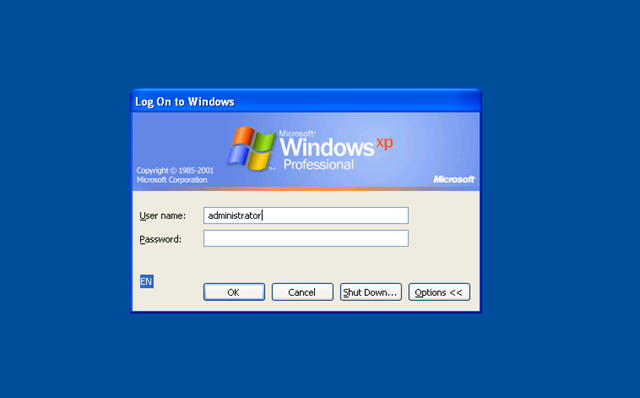
After the Preload setting has been changed I logged off and keyboard preload was changed to the new English layout.


baumschnitt apfelbaum
Along with everything which appears to be developing within this subject
matter, many of your opinions are relatively stimulating.
Having said that, I am sorry, because I can not give credence to your entire plan, all
be it stimulating none the less. It appears to everybody that your opinions are generally not entirely
justified and in actuality you are generally your self not really entirely confident of
your point. In any case I did enjoy reading through it.
Adam
It is not my first time to pay a quick visit this site, i am visiting this
site dailly and obtain fastidious data from here all the time.