
 Hi there! Welcome to my blog. My name is Ivan. I am a Dutch IT Professional working as Principal IT Consultant.
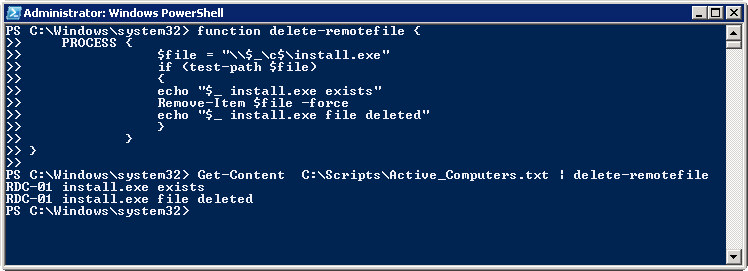
 The following PowerShell script recipe will help you delete a remote file based on a list of computers stored in a text file. New PowerShell function will be created during the session which will be piped from the text file.
Create new file named C:\Scripts\Active_Computers.txt and populate the computer names.
function delete-remotefile {
    PROCESS {
                $file = "\\$_\c$\install.exe"
                if (test-path $file)
                {
                echo "$_ install.exe exists"
                Remove-Item $file -force
                echo "$_ install.exe file deleted"
                }
            }
}

Get-Content  C:\Scripts\Active_Computers.txt | delete-remotefile
That’s it.


Ram
Thanks!!! This worked out for me
Tom
Thanks Ram. How would you go about deleting specific file types. For example: I want to delete all .pst files from a list of computers.
Brian Cassidy
How could I change this script to delete a list of files (list.txt)?
Paul Edwards
Can this be used to delete PST files, if so on what OS XP and Windows 7
Amit
Hii
I would like to know if the aboe script would work for computers which are password protected because I have around 400 machines in the domain and I wanted to delete some log file and txt file from all the computers
Thanks
Amit
carlos porras
Id doesn’t work for me.
I have a folder named: C:\scripts\master2
it has inside
clean2.ps1
computers.txt
I run the script on the same computer and i get:
PS C:\scripts\master2> .\clean2.ps1
Get-Content : Cannot find path ‘C:\scripts\master2\computers.txt’ because it does not exist.
At C:\scripts\master2\clean2.ps1:13 char:12
+ Get-Content <<<
any advice?
Sven
Great script. Thanks. You just saved me a few hours of my life.
sysadmin
New to powershell – Thanks! This saved me a lot of time. Appreciate it!
Sumit
Brilliant!
ATX
This worked great. I medified it to use wildcard for logs and it saves so much time.
Thanks!
ATX
This worked great. I modified it to use wildcard for logs and it saves so much time.
I will call if from my stop script tp dp the cleanup once systems are stopped.
Thanks!
Laiq
Thank you sir!
Could i take it one step further and ask how can we delete temp files for all users on any given machine that are active for last 60 days ?
Please and Thank you!