
 Hi there! Welcome to my blog. My name is Ivan. I am a Dutch IT Professional working as Principal IT Consultant.
 After 6 years of working with Windows Server 2003 I finally made this script to disabe the restricted IE mode. Microsoft already fixed this feature for Windows Server 2008 and it can be easly switched off in Server Manager. For Windows Server 2003 you still need to open appwiz.cpl and run the steps.
The warning I was presented over and over.
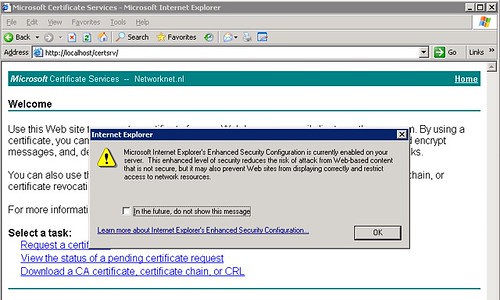
This message make sense but not when I need to update latest firmware, drivers or work on a certificate authority as shown in my example.
- Create new file named disable “IE-Security.txt”.
- Add following text: [Components] IEHardenUser=Off IEHardenAdmin=Off and save the file.
- Save the file and run from command line SYSOCMGR.EXE /i:%windir%\inf\sysoc.inf /u:c:\IE-Security.txt
This made my server now less secure but my life easier to get this done.


peace signs
If you are going for most excellent contents like I do, just visit this web page every day because
it offers feature contents, thanks
on line nursing degrees
I’m really enjoying the design and layout of your website.
It’s a very easy on the eyes which makes it much more enjoyable
for me to come here and visit more often. Did you
hire out a developer to create your theme?
Excellent work!
ÙضائØ
Nice blog! Is your theme custom made or did you
download it from somewhere? A theme like yours with a few simple tweeks would really make my blog stand out.
Please let me know where you got your theme.
Thanks
sterling
It’s going to be finish of mine day, but before end I am reading this enormous post to improve my knowledge.
android Telephone
whoah this blog is great i really like reading your articles.
Stay up the good work! You know, many persons are searching around for this information, you could help them greatly.