
 Hi there! Welcome to my blog. My name is Ivan. I am a Dutch IT Professional working as Principal IT Consultant.
 My Openfiler iSCSI SAN failed and all virtual machines on my Virtual Center Server needed to be reboot. After reboot the “VMWare VirtualCenter Server” service failed to start showing the following error message:
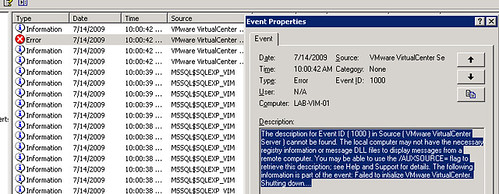
I opened Windows Explorer, browsed to to C:\Documents and Settings\All Users\Application Data\VMware\VMware VirtualCenter\Logs and opened latest vpxd-XX.log log file. I found the following error in mine:
I opened C:\Documents and Settings\All Users\Application Data\VMware\VMware VirtualCenter\ssl folder but it was empty; I searched for rui.crt in C:\ and found two other directories with similar certificate in:
- C:\Program Files\VMware\Infrastructure\Converter Enterprise\ssl
- C:\Program Files\VMware\Infrastructure\Update Manager\SSL
I copied C:\Program Files\VMware\Infrastructure\Converter Enterprise\ssl to C:\Documents and Settings\All Users\Application Data\VMware\VMware VirtualCenter\ssl\ and started “VMware VirtualCenter Server” service again. Now the service was successfully started. Login with VMWare Virtual Infrastructure client and connect your ESX hosts again.


Jorge
Thank you very much Ivan!!!!
Pete Long
Can also happen if the DB gets over 4GB, Here’s some more information that might be helpful,
vSphere – Virtual Center Server Service Stops
Pete
PeteNetLive
Ivan Versluis
Thanks Pete. I approved your comment due to inserted hyperlink.
Very useful KB and it applies to my post too. If your DB becomes 4 GB large and you need to keep the database then moving it is also a good reason.
Ramesh
i could solve this problem with Ad server sync(this may be related with ssl)
Gaurav Baghla
Atleast one of the solution would definetly Work
1)Move default website to port 8080
2)All you should have to do is delete the ODBC connection and create a new one this time specifying SQL Server authentication instead of Windows authentication
3)disable SQL Server Reporting Service