
 Hi there! Welcome to my blog. My name is Ivan. I am a Dutch IT Professional working as Principal IT Consultant.
 Last week I planned to migrate some virtual machines running on a VMWare Server 1.x Windows host to aVMWare ESX 3.5i host.
One of the vm’s is running as license server and the registration key was registered by using the MAC of the network interface. I had to keep the MAC address of this VM. I first read this post.
I tried to manually set the MAC address from VMWare client but go the following message:
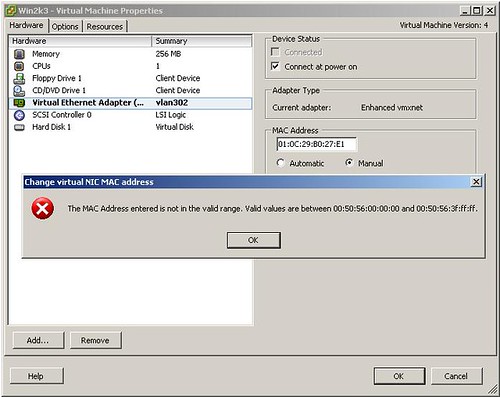
Then I removed the vm from ESX inventory; download the vmx file and changed the ethernet0.addressType to static. I used Notepad+ to change ethernet0.Address = “01:0C:29:B0:27:E1” value. I deleted original file from the Datastore and upload the vmx file back. I started the vm again and got the message below:

Without an additional setting in the vmx config file you won’t be able to assign a static MAC address in the range your require. To disable mac address checking before boot add the following line in the vmx file.
Thanks to Jason Nash I fixed my problem. http://jasonnash.wordpress.com/2008/08/30/disabling-mac-address-checking-in-vmware/
My working config changes:


Radek
VMWare ESX 3.5i U4
🙁
—————————
Error
—————————
00:0E:2E:0C:07:8F is not an allowed static Ethernet address.
Invalid MAC address specified.
Failed to configure ethernet1.
Ivan Versluis
ethernet0.present = “true”
ethernet0.networkName = “vlan1”
ethernet0.checkMACAddress = “false”
ethernet0.addressType = “static”
ethernet0.Address = “00:0C:29:B0:27:E1”
This is the config I used for the NIC interface. Please check on your end.
guy
so i’ve esx 3.5 U4. this solution is not working.
Ivan Versluis
Well I got this solution working when migrating the VMWare Server virtual machine to ESX i.
Please make sure that you:
Remove virtual machine from inventory
Download the vmx file from datastore to local drive
Delete vmx file from datastore
Edit the vmx file with Notepad++ with configuration settings above
Upload the new vmx file to datastore
Register the vmx file with ESX server
Philipp
Thank you for this info.
I can confirm it works with ESX 3.5.0 Build 153875.
chukaman
Awesome this rocks. Working happily on ESX 3.5.0 Build 153875 for me as well. I barely obeyed your instructions, but what I needed was:
ethernet0.checkMACAddress = “false”
Thanks 🙂
Tim Nordloh
I found this same error manifested when the filesystem got full, due to a vmware.log. Anyone know how to disable this logfile?
Reza Toghraee
Perfect man, Thanks so MUCH.!!
Kris
is anyone tried to change the MAC from “00:50:56:00:00:00-00:50:56:3F:FF:FF” range as static for VMXnet 3 type NIC?
mea_john
Solution is working on ESX 4.1u1
Nguyen Viet Anh
place file vmx in VMware ESXi 4.1
Alex
Tried all options listed here but could not set static mac address on ESX 3.5.0 U 110268.
fred
Tried this on a recently upgraded ESX 5.1 host, but can’t seem to get it to work?! Removed the vm from inventory, deleted the wmx file, uploaded and added to inventory. I have got the following settings in my wmx file:
ethernet0.present = “true”
ethernet0.virtualDev = “e1000”
ethernet0.wakeOnPcktRcv = “false”
ethernet0.checkMACAddress = “false”
ethernet0.networkName = “VM Network”
ethernet0.addressType = “static”
ethernet0.address = “00:0c:29:d3:aa:e3”
Ivan Versluis
Hi Fred,
I have not tried this myself on a ESX 5 server.
I am not able to verify suggested configuration right now. If you do find a solution somewhere else please let me know.
Thanks.
fred
Upon further reading of the release notes (https://www.vmware.com/support/vsphere5/doc/vsphere-esx-vcenter-server-51-release-notes.html#networkingissues) I found something that seem to apply here – or have I got it all backwards?!
“… Prefix- and range-based MAC address allocation is supported only in vCenter Server 5.1 and ESXi 5.1. If you add pre-5.1 hosts to vCenter Server 5.1, and use anything other than VMware OUI prefix- or range-based MAC address allocation, virtual machines assigned MAC addresses that are not VMware OUI prefixed fail to power on their pre-5.1 hosts. ”
I might have to rethink my approach – revert back to esx 5.0 and try to correct the misbehaving vm (it is an Ubuntu with misconfigured Samba that won’t boot unless the expected MAC address is used)?
fred
So, I reverted back to 5.0 and was able to boot the vm. Followed the instruction in this post http://www.serenux.com/2009/11/howto-fix-a-missing-eth0-adapter-after-moving-ubuntu-server-from-one-box-to-another/ to get the VM to accept a vmware approved MAC. The reason I couldn’t do this (without reverting to 5.0) was that the vm had a Samba automount on boot that failed and caused the machine to hang 🙁 Seems like I’m back on track! Thanks!
Ranvir (SMTP Server)
Thanks its working like charm on my smtp server
Remove all the ethernet0 or ethernet1 instances and add the above code at the end of .vmx file and it works great even into esxi 6 + vspher clinet 6.
Thanks and hoping best of luck always.
BC
Just used Ranvir's lines in Vsphere 7.0 current release – worked as desired.
Was a Shoretel Server that I had to move to a new host as old one was dying.
spun up and they tie license to MAC – client doesn't pay for maintenance so doubt they'd help – rekey – being it is ~5 years beyond
(I recoomend moving away to something simple like FreePBX or other well supported cost effective platform!)