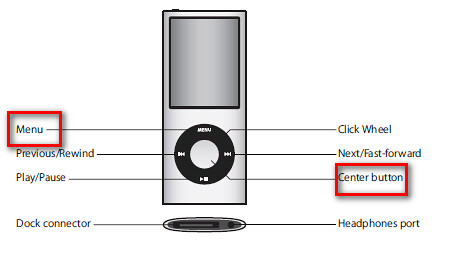
My Apple iPod Nano 8GB froze. I connected the iPod to my pc where Apple iTunes was installed. To fix that problem see my instruction below:
- Press and hold the Menu and Center buttons for at least 6 seconds, until the Apple logo appears.

 Hi there! Welcome to my blog. My name is Ivan. I am a Dutch IT Professional working as Principal IT Consultant. Read more about me..
My Apple iPod Nano 8GB froze. I connected the iPod to my pc where Apple iTunes was installed. To fix that problem see my instruction below:


Alex
i just bought my refurbished i pod nano 8g. It froze up and all i am seeing is a blank gray screen. I have tried to reset it by pressing the center button and the menu button but it still wont reset. What should i do
bodydetox
iPod nano is very good as a walkaround mp3 player. my only complaint is that the included headphones lack good bass. I replaced it with the Sennheiser CX-300 and the sound was awesome.
Kenneth
Had a few Freezes now on my ipod 8g kinda seems to happend when i try to recharge it, it worked to reset it the first time but not more then that, After that i just try to reset, if it dosent work i just plug it in to my computer and it seems to work perfectly, Guess you need to have full battery for it to work to
Bill Bartmann
Excellent site, keep up the good work
Shashi
Thanks a zillions dear, It solved my problem…!!!
Luv U…!!!
Walter Buitrago
Thanks a bunch!!!!!!
My iPod 4Gb just stop working….no power, could not reset, but following these instructions, I have my iPod working again. Thxs!
“Press and hold the Menu and Center buttons for at least 6 seconds, until the Apple logo appears” and that was it!!!!
jerad
hi my 8 gb ipod will not turn on i left it in cold car n left it on so battery went dead plugged it into computer it makes no sound it dosent reconize it neither does itunes tried reseting it over n over nothing works and ive been letting it sit on charger for over an hour now
Dani
It worked !!!!!!!!!!!!!!!!!!!! THANK YOU :o)
Dani
IT WORKED… thank you :o)
survivor
not worked with my Ipod nano.. 🙁
Nicki
Thank you so much, you saved my life xD
salim
yer7am waldik :*
salim
god blest your parents in Arabic (Algerian) 😉
Sheila
Yaaaaaay! Thanks you saved me a bunch . . . .
melissa marie
i have a question my ipod 8GB is locked & i’ve i forgot my password i’ve tried many ways to unlock it yet it wont work i’ve also tried to rest it, it also didn’t work what can i do?
Alexis
Okay so my ipod nano 8GB Has a code on it && i dont remember the passcode. if i tried this would it reset the password to where i can get bback into it?
brenda
i cant get it to unlock i have tryed holding the center and the menu did not work
Jamie
my 8g ipod nano will not turn on charge or reset… plugged in or not to a computer or wall outlet… is there any other way to reset or restart without having to tear into it?
hilal
It froze up and all i am seeing is a blank gray screen. I have tried to reset it by pressing the center button and the menu button but it still wont reset. What should i do
Jakriah
My iPod want work and I press and hold the button
Bubele Skweyiya
Good day, I haven't used my 8gb ipod nano in years and I forgot the password (4 numbers?) What should I do to open it?