
 Hi there! Welcome to my blog. My name is Ivan. I am a Dutch IT Professional working as Principal IT Consultant.
 If you are a software packager and planning to script the Adobe Reader for enterprise software deployment, then Adobe Customization Wizard tool is definitely you need to have when customizing Adobe Reader settings.
Adobe Customization Wizard is a free download-able utility designed to help IT professionals take greater control of enterprise-wide deployments of Adobe® Acrobat® and Adobe Reader®. With it you can customize the Acrobat installer and application features prior to deployment. Providing a graphical interface to the Windows Installer for Acrobat, the Customization Wizard enables IT administrators to:
- Modify the installer via a transform file (MST file) without altering the original package (MSI file)
- Customize the look and feel of Acrobat or Reader before deployment to meet the unique needs of your user base
Why use Adobe Customization Wizard?
Key features:
- Optimize the behavior of the installer by including silent installation, preserialization, multilingual, and custom setup choices
- Remove previous versions of Acrobat and Reader
- Suppress the EULA, registration prompts, and the Getting Started window
- Customize key application preferences — turn off automatic updates, add and set default job options, and customize collaboration and security settings
- Remove shortcuts from the desktop and the Start menu
- Edit each Adobe Acrobat application’s registry and installer tables
- Customize file attachment handling within PDF files, including specifying which file types you want to block
- Add or edit files that will be installed, including customized JavaScript or plug-ins
- Preconfigure Acrobat Connect and disable it
- Preconfigure and lock Enhanced Security settings
- Deploy custom Portfolio navigators
- Add or remove custom redaction code sets
- And much more!

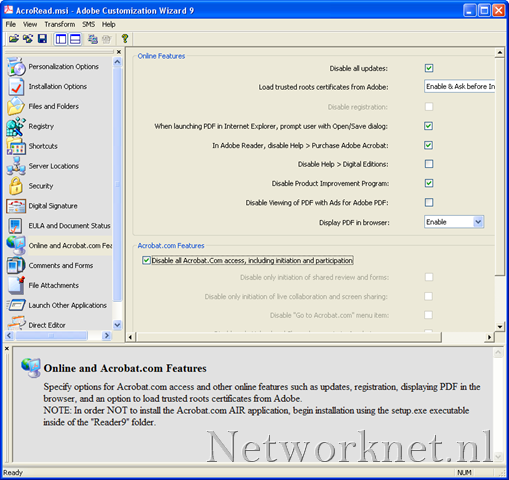
This tool helped me in generating MST file to create automated installed of the Adobe PDF Reader application. One of the common tasks as system administrators is disable automatic updates and other application prompts. I created a CMD script to deploy the installation to my clients using the MSI and MST files.
Related links:
- Download Adobe Customization Wizard from http://www.adobe.com/support/downloads/detail.jsp?ftpID=3993


Leave a comment