
 Hi there! Welcome to my blog. My name is Ivan. I am a Dutch IT Professional working as Principal IT Consultant.
 On my Exchange 2007 server inbound mail traffic did not work. I was able to send out emails, but when receiving the replies failed (all bounced).
During the migration I configured a second mx record at my hosting provider. All undelivered emails were forwarded to the second mail server. My Outlook client was configured to the second POP3 mailbox and everything worked fine from the surface. After getting the following Delivery notification from LinkedIn and Gmail I started to troubleshoot my problem. From Gmail I got the message below:
After reading this message I checked my Exchange 2007 Receive Connector and confirmed Transport Layer Security (TLS) was selected.
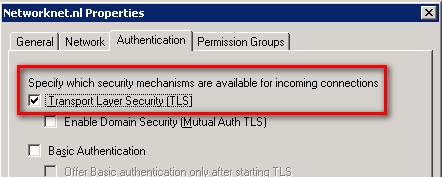
I unchecked the TLS setting and applied the Receive Connector configuration. Resend a new mail from Gmail to my primary account and the email failed again.
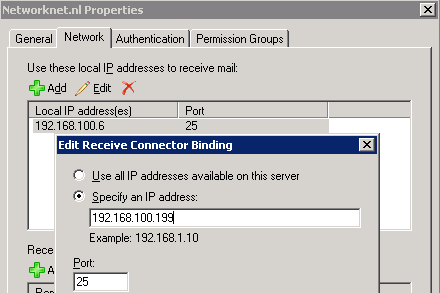
I went back to the receive connector and checked the Network tab. I run the ipconfig and saw that the IP addresses did not match. Changed the binding IP address to the one assigned on the server. My test from Gmail worked now.
I can’t figure out why this setting was wrong; during the installation I overlooked things. Anyway! I am happy my inbound email traffic is working and receiving lot’s of SPAM now.


Leave a comment