
 Hi there! Welcome to my blog. My name is Ivan. I am a Dutch IT Professional working as Principal IT Consultant.
 If you are running a Windows Server 2008 virtual machine with “AD DS” Services (Domain Controller) and you installed Exchange 2007 SP1 on the same machine than three services may fail to start. During the boot process of the virtual machine Active Directory Services are not ready and some Exchange 2007 services will fail to start.
Screenshot of the Services console during my troubleshooting actions.
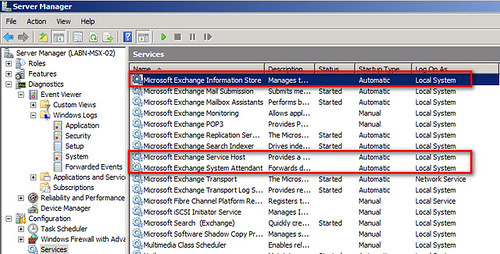
Microsoft Exchange Information Store, Microsoft Exchange Service Host and Microsoft Exchange System Attendant services are not started. The Startup Type of has been set to Automatic.
The System EventViewer will show the following error events:
- EventID 7024: The Microsoft Exchange Information Store service terminated with service-specific error 0 (0x0).
- EventID 7009: A timeout was reached (30000 milliseconds) while waiting for the Microsoft Exchange Service Host service to connect.
- EventID 7000: The Microsoft Exchange Service Host service failed to start due to the following error: The service did not respond to the start or control request in a timely fashion.
- EventID 7022: The Microsoft Exchange Transport service hung on starting.
Exchange Management Console message:
- ERROR: Could not connect to the Microsoft Exchange Information Store service on server Networknet.nl. One of the following problems may be occurring: 1- The Microsoft Exchange Information Store service is not running. 2- There is no network connectivity to server Networknet.nl. 3- You do not have sufficient permissions to perform this command. The following permissions are required to perform this command: Exchange View-Only Administrator and local administrators group for the target server. 4- Credentials have been cached for an unpriviledged user. Try removing the entry for this server from Stored User Names and Passwords.
To fix this problem change the Startup Type of Microsoft Exchange Information Store, Microsoft Exchange Service Host and Microsoft Exchange System Attendant to “Automatic (Delayed Start)”

Reboot the virtual machine again and everything should be started as smooth as you would have two separate virtual machines.
Related links:


Philadelphia IT support
Setting delayed start for the aforementioned Exchange services didn’t fix the problem for us.
It appears Exchange 2007 needs IPv6 in order to run on Windows Server 2008 unless you completely disable IPv6.
Here’s the steps:
Run: regedit or regedt32
HKEY_LOCAL_MACHINE\SYSTEM\CurrentControlSet\Services\Tcpip6\Parameters
Create a dword (32-bit) value and name it as “Disabled Components” and then click OK
Double click “Disabled Components” and type 0xffffffff(hexadecimal value) or 4294967295 (Decimal value)
Note: The above value 0xffffffff(hexadecimal value) or 4294967295 (Decimal value) will disable all IPv6 components, except the IPv6 loopback interface.
{Natural
A Beginners’ Guide to Facebook Enterprise Pages
James Vallad
Hello,
you just saved my life.
Thankkkkkkkkkkkkkkkkkkkkkkkkkkkkkkkkkkkkkkkkkks.
Ken Schnider
I love you man….