
 Hi there! Welcome to my blog. My name is Ivan. I am a Dutch IT Professional working as Principal IT Consultant.
 I copied one of my Windows XP virtual machine running on a VMWare Server 1.02 system locally to my workstation. After the files were copied I opened the vmx file with VMWare Workstation 6 and received the following error below after trying to start the virtual machine. The virrtual machine contained one snapshot on the VMWare Server.
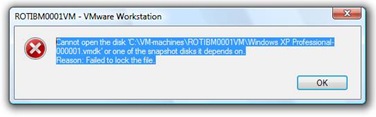
Locate the virtual machine in Windows Explorer and delete any .lck folders

Start the virtual machine. If boot process will fail, try to Map the virtual hard disk to Z:\ for example.
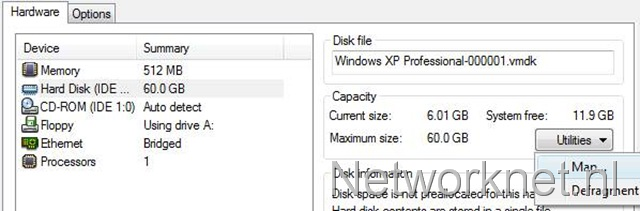
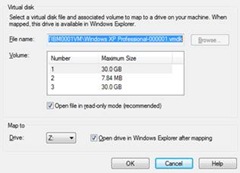
I then disconnect the virtual hard disk and tried again. The virtual machine boot without any problem and my snapshot was still valid. Deleting the .lck folder saved me a lot of work.


BT
Thanks! Worked for me.
–BT
tex
I virtualized a fisical machine but when i tried to open on workstation i got the same error: failed to lock the file. So i removed the 2 folders .lck but when starting again the machine i get this error: Cannot connect virtual device ide1:1. No corresponding device is available on the host.
It tries to open but as soon as windows screen appears i get a blu screen! i tried to map the drive to z as you suggested but i get the same error.
Can you helpme please. thanks
Ragu
Thank you for your post, it worked great! thanks for sharing the knowledge!
kotwun10
Works! Great Tip
Ngo viet yen
Wow i did it. Great thanks.
Simon
Worked for me as well!
thanx
anonymous
Thanks so much for sharing this with us. 🙂
John
Yep ty, worked 4 me.
boby2k
tks a lot
nye
Very very thanks!
Captain Solo
I had a similar problem after a power outage. In /var/lib/vmware/Virtual Machines/ there are 2 folders which end in .lck. Deleting both of these solved my problem
Me
Thanks worked for me as well and I was running Ubuntu on VM not windows!
Tarcio
Worked. Thanks.
Dopu
Worked. Thanks.
belson
Thanks… it worked
P4W3R
You are the best
carlo
Grasia fiera, me rre sirbio
Gilbert M Hale
Renaming the .lck files (safer than deleting until I verified it would work ) worked perfectly for me. I am running VMware Server 2 under an Ubuntu Server v-8.04 64 bit platform, Dell Precision T3400 8Gb RAM machine.
I had been running several VMware Workstation machines under XP Pro with VMware Workstation v-6.5 with a Dell Vostro 220 4Gb RAM machine, and wanted to migrate the virtual machines to the VMWare Server 2 for better load balancing, and on a higher RAM machine for greater concurrent virtual machine density. Imagine my surprise when the first imported machine worked great. The others did not, until I renamed the .lck files. Your post saved me hours of setting up new virtual machines.
Thank You!
Gil
ruch
Wow, thanks a lot, u saved so much of my time 😀
leezo
Thanks a million that worked 🙂
ugo montorsi
ho lo stesso problema ho fatto le seguenti prove:
ho la vmware server con windows 2003 server su server linux red hat 5 enterprise edition
1: cliccando su start mi dà l’errore:
Unable to Power On virtual machine with “A General System error occurred: Internal error”
2: ps -eaf|grep vmware
root 26375 19955
Message from hyperion.sin.it: Cannot open the disk ‘/u03/VMachine/W2k3PLA/W2k3PLA.vmdk’ or one of the snapshot disks it depends on. Reason: Failed to lock the file.
qual’è il pid è 26375 o 19955
3: devo fare kill 26375 o kill 19955
e riavviare la virtual machine?
aspetto una mail di risposta.
grazie cordiali saluti
dott. ugo montorsi
Brian
Thanks a million… worked for me and saved my VM!
Pallav
Cheers, Works Like A Beauty
mj
thanks
roly
gracias fiera me sirvio mucho ya lo daba por muerto mi maquina virtual
pk
Thanks dude. It worked………
Jeff
Awesome. You are my hero.
Babu
Excellent!!!!! It works for us, thankyou very much!
Prasanjit
Thanks it worked great for me
Jokohanho
Thanks. It worked for me aswell!
Rich
Great, worked perfectly! Cheers!
Biliballa
Nice! It worked!
Niels Brinch
Just wanted to add my name to the long list of people who solved their problem from this tip. Thanks.
dom
thanks… worked for me too. good job.
Mehr
Thanks a bunch!!….You saved so much of my time!
philip
Thanks!!
Prashant
thanks a lot … it really saved a lot of time .it was great help .
totad
thanks it worked
Klaus
Thanks, great information, solved my issue 🙂
Rherrera
muy bien, muchas gracias. Thanks.
beny
dzieki wszytko dział!
thx everty thing work
Paul
I’d just like to add my thanks too! I had my heart in my mouth when I thought I’d possible lost yesterdays development work but everything is running again. Thanks!
Ahasan Kabir
Thanks a lot. It is grate solution.
When i upgrade from VMServer 1.8 to VMWare Server 2.0, I can’t open my os. I am confuse what i can do, after that i try to find the solution. From this site i get solution. Just i delete the two lock the from vm directory as per recommendation. Thanks a lot.
Rigo
Excelente!!!
Oberon
I ran into the same problem when I moved from VMWare server to VMWare Workstation. Your solution worked for me too. Thanks for sharing!
Ced
The error occurs most of the times because VMware finds a lock directory in the same directory as the VHD.
The simple solution is to remove this directory (you’ll recognize it by the extension ‘.lck’)
The error is most likely caused by a wrong shutdown of VMware (either it crashed, or your PC crashed, or you just broke it. whatever applies 😛 )
Happy virtualizing~
Bryan
Exactly what I needed. Thanks a ton 🙂
Roderick
Excellent! That is all i need to know! Worked great.
Zembold
Thanks! 😉