
 Hi there! Welcome to my blog. My name is Ivan. I am a Dutch IT Professional working as Principal IT Consultant.
 At some point my Windows based VMWare Server server run out of disk space where couple of important production virtual machines were running. Windows started to complain about low disk space and I had only 32KB space left. I tried to open VMWare Server console and I got the error message below “511 vmware-serverd service is not running.” All virtual machines were running except the one which consumed the remaining disk space.
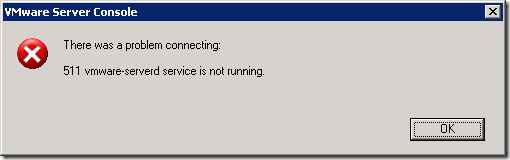
To solve this issue I had to:
- Shut down one of the virtual machines by using remote desktop connection.
- Move the virtual machine directory to another VMWare Server host
- Bring other virtual machines down by using remote desktop connection. At some point I could not shut down two remaining virtual machines. Both were not accessible by RDP and SSH for the linux one
I opened Task Manager and located the remaining processes for the virtual machines.
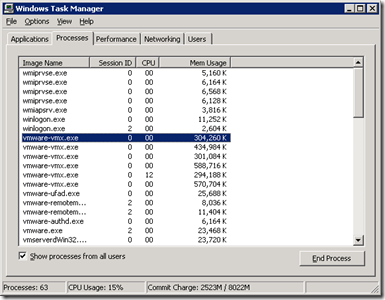
vmware-vmx.exe is an individual process for each of the virtual machines. Two were left and I stopped both vmware-vmx.exe processes. I opened Services.msc console and I then restart the “VMware Registration Service” service.
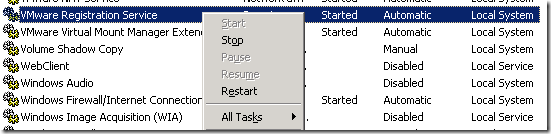
After the service was restarted power on task started. All virtual machines were up and running. Killing the process and moving some directories solved the problem with my VMWare Server.
This event brings me back to the root cause of why this happened. One of the import things I learned is to size your virtual machines and their disk space. I am going to implement thresholds and notifications with CactiEZ appliance soon.


ram
It’s a very good post.
Thanks for the help.
Ram
Mike D
Windows Registry Editor Version 5.00
[HKEY_LOCAL_MACHINE\SYSTEM\CurrentControlSet\Services\VMAuthdService]
“DependOnService”=hex(7):76,00,6d,00,78,00,38,00,36,00,00,00,77,00,6d,00,69,00,00,00,00,00
This is the fix, copy the above to a file with a .reg extension and run it. It will add a dependency to the VMWare Authentication service
Claudio Laurita
Thanks a lot to Mike D.
I had a similar problem running VMware server 1.05 on a 2kpro.
The missing wmi dependency caused a fault in Auth service start that caused a fault in registration service start.
With his fix, everything works fine.
Claudio Laurita
yannis
I have no VMware Registration Service. What I have to do?
ab
Very helpful post. Thank you
mobo cray
thanks a lot..
XD
-RAM-
Thanks….
reN
Thank you! this post help me to solve problem 🙂
Arun.PC
Fantastic! Was stuck with this error and following your article got it working. Keep writing good solutions like these.
Thanks,
Arun.P.C
http://www.arunpc.com
Homer
Thank you.
Your post helped me resolve my problem
sud
thanks a lot..very helpful
raf
Thank you!!!!
Good post
sphinxradycal
thank u for help !!!!!!!!!!!!!!!!!!!!!!!!!!!!!!!!!
Benz
thanks you, very helpful post!
Boss
Very useful Info. Thanks a lot!
Pavel N
Make D, thanks a lot!
angie
Thanks Ivan! This post addressed my problem.
abo
Hi all,
Thanks for this suggested fixe but it does not fixe my issue.
I applyied this fixe provide by Mike but no success.
I uninstalled VmWare then reinstalled it: issue still present.
Any ide is very welcome.
Thanks,
torteflo
Hi abo,
did you upgrade your vmware server version?
what is your current one?
armando
very good post, thanks!
sky86
I use XP os
I execute this command :
C:\Program Files\VMware\VMware Server\vmserverdWin32.exe
than i solve this problem!
Shruti
This helped a lot. thanks!
amit
hi,
when i start vmware it is showing “vmware authorization service is not running” .
emma
thank you !
I just do as 21#said,and it’s solved in XPsystem.
Puneeth
awesome 🙂
It resolved my issue 🙂
Kimberly
Great site and thanks for your help!
Navoday
Thanks a lot!!!!!
Ann
Thanks a lot. It helped me!!