
 Hi there! Welcome to my blog. My name is Ivan. I am a Dutch IT Professional working as Principal IT Consultant.
 I am running CactiEZ VMWare appliance for a while and couple of graphs I was looking for were not integrated in the SNMP configuration.
CactiEZ is based on CentOS linux distribution.
Verify SNMP Daemon is running
<br>[root@CACTI-04 /]# ps -ef | grep snmp<br>root 29283 1 0 Jan06 ? 00:00:00 /usr/sbin/snmpd -Lsd -Lf /dev/null -p /var/run/snmpd -a<br>[root@CACTI-04 /]#<br>
Rename the default configuration file
<br>[root@CACTI-04 /]# mv /etc/snmp/snmpd.conf /etc/snmp/snmpd.org<br>[root@CACTI-04 /]# ls /etc/snmp/<br>snmpd.org<br>[root@CACTI-04 /]#<br>
Create new file with your own SNMP configuration
<br>[root@CACTI-04 /]# vi /etc/snmp/snmpd.conf<br>###########################################################################<br>#<br># snmpd.conf<br>#<br># - created by the snmpconf configuration program<br>#<br>###########################################################################<br># SECTION: System Information Setup<br>#<br># This section defines some of the information reported in<br># the "system" mib group in the mibII tree.<br># syslocation: The [typically physical] location of the system.<br># Note that setting this value here means that when trying to<br># perform an snmp SET operation to the sysLocation.0 variable will make<br># the agent return the "notWritable" error code. IE, including<br># this token in the snmpd.conf file will disable write access to<br># the variable.<br># arguments: location_string</p> <p>syslocation NETWORKNET<br># syscontact: The contact information for the administrator<br># Note that setting this value here means that when trying to<br># perform an snmp SET operation to the sysContact.0 variable will make<br># the agent return the "notWritable" error code. IE, including<br># this token in the snmpd.conf file will disable write access to<br># the variable.<br># arguments: contact_string</p> <p>syscontact Ivan Versluis<br>###########################################################################<br># SECTION: Access Control Setup<br>#<br># This section defines who is allowed to talk to your running<br># snmp agent.<br># rocommunity: a SNMPv1/SNMPv2c read-only access community name<br># arguments: community [default|hostname|network/bits] [oid]</p> <p>rocommunity net_ro_public<br>###########################################################################<br># SECTION: Agent Operating Mode<br>#<br># This section defines how the agent will operate when it<br># is running.<br># agentaddress: The IP address and port number that the agent will listen on.<br># By default the agent listens to any and all traffic from any<br># interface on the default SNMP port (161). This allows you to<br># specify which address, interface, transport type and port(s) that you<br># want the agent to listen on. Multiple definitions of this token<br># are concatenated together (using ':'s).<br># arguments: [transport:]port[@interface/address],...</p> <p>agentaddress 127.0.0.1:161</p> <p>ESC and :wq! to save and exit the file.<br>
Reload the snmpd.conf file and verify the SNMP configuration with snmpread
</p> <p>[root@CACTI-04 /]# service snmpd reload</p> <p>Reloading snmpd: [ OK ]</p> <p>[root@CACTI-04 /]#</p> <p>
Open the Cacti Devices and choose to add new host.
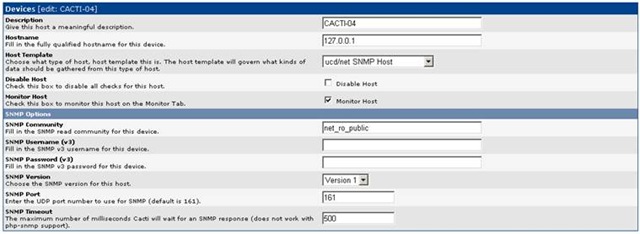
After new device has been added and the new CentOS device is being reopened the device should show the SNMP configuration like mine.
CACTI-04 (127.0.0.1)
SNMP Information
System: Linux CACTI-04.almatis.internal 2.6.9-34.EL #1 Wed Mar 8 00:07:35 CST 2006 i686
Uptime: 12822505
Hostname: CACTI-04.networknet.nl
Location: NETWORKNET
Contact: Ivan Versluis
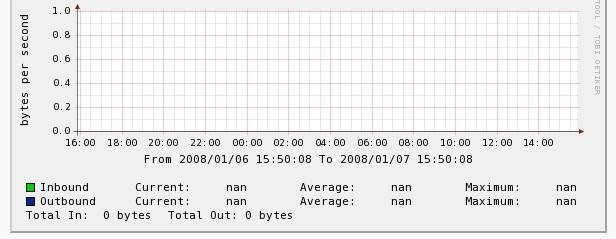
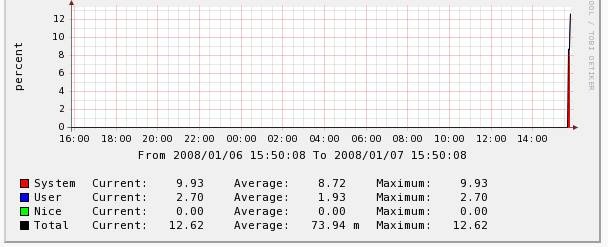
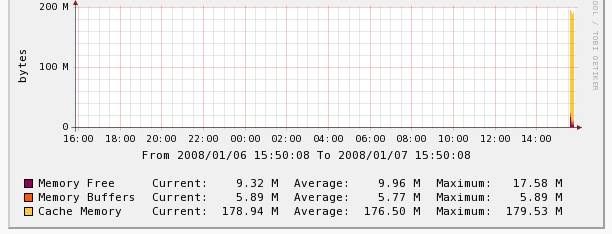
Last step would be to create new graps. Depending on the host template choosen cpu, memory and nic graps can be created.
NIC
CPU
Memory


Chris
Hello, I am trying to figure out why cacti is not graphing some data and I see errors in getting the SNMP data in my cacti logs so I came to your site. I just thought I would let you know it is very hard to read your “code” because there are HTML tags inside your “code” view on your blog. I would use a better plugin.