
 Hi there! Welcome to my blog. My name is Ivan. I am a Dutch IT Professional working as Principal IT Consultant.
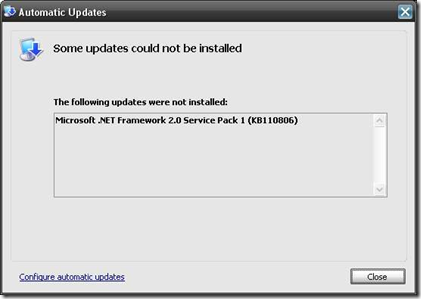
 Microsoft released their Service Pack 1 for Microsoft .NET Framework 2.0 (KB110806) which was available for install through Automatic Updates. For some reason the Service Pack 1 did not install on my Windows 2003 Server. The update generated several error messages in the system event log.
In my specific case the SP1 update failed and the Windows Update Agent (Automatic updates) tried to reinstall the update over and over. The failed updated caused that “SQL Server Agent” service (Microsoft SQL Server 2005 Server) failed to start. The service was depending on the .NET Framework and all scheduled jobs failed to run on the SQL server.
This behavior may also occur with:
- Autodesk Autocad 2008
- Quickbooks 2008
- Backup Exec
- Any other application depending on .NET Framework
I dealt with this issue and by documenting my steps I hope it will help you fixing your failed .net update installations.
Check Windows Event Viewer System log
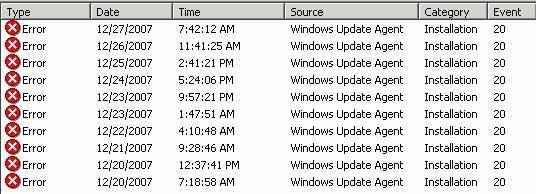
When checking error messages in the WSUS Update Services console I found following event:
I tried to remove KB928365 security update manually.
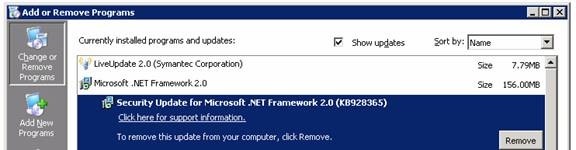
I got a warning when I tried to remove KB928365 manually.
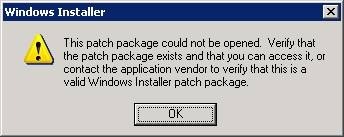
My last option was to uninstall Microsoft .NET Framework 2.0
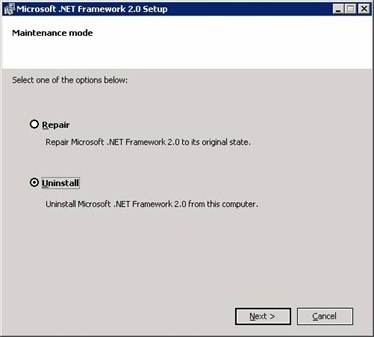
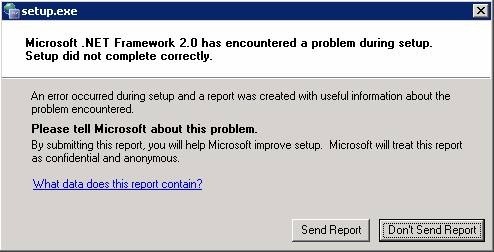
Setup stopped with a encountered problem.
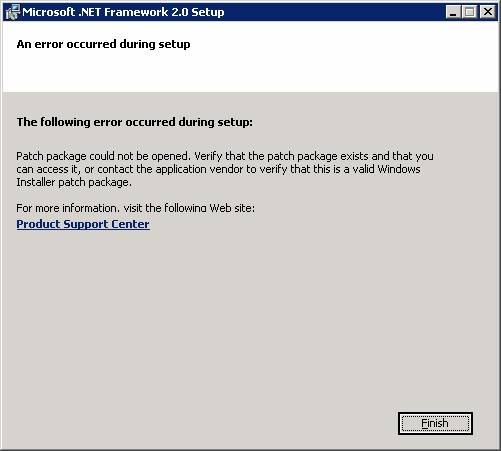
So I ended with a failed installation of .NET Framework 2.0 and the SQL Server agent was not running. SQL server 2005 was still working.
I googled and I found couple of threads at Microsoft newsgroups suggesting to uninstall the installation using a tool “Windows Installer Clean Up”.
I created the following “User guide” how to remove the failed installation of Microsoft .NET Framework 2.0 Service Pack 1 (KB110806) using the “Windows Installer CleanUp Utility”.
I download the utility from http://support.microsoft.com/kb/290301 and installed msicuu2.exe. From Start Menu, I run Windows Installer Clean Up shortcut , selected (All Users) Microsoft .NET Framework 2.0 and removed it.
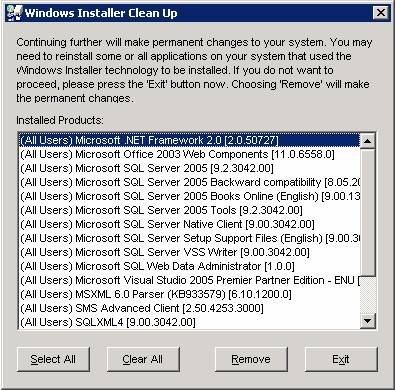
I reinstalled .Net Framework 2.0 again, I went back to the Automatic Updates client directory C:\WINDOWS\SoftwareDistribution\Download\Install and rerun NetFx20SP1_x86.exe. The installation was successful now.
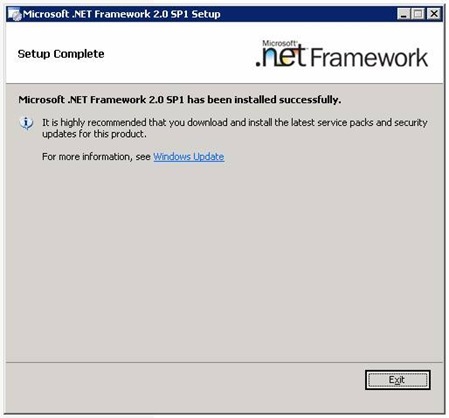
The combination of KB928365 and KB110806 resulted in a failed deployment. It took me some time to research, remove and reinstall the framework but in the end the output was satisfying. The utility can be used to remove any MSI based installation and this particular case I used it to remove the .Net Framework suite.


Thankful
Experienced this in a production environment, brought us down for over an hour. If it wasn’t for your post, it would have been two.
Thanks –
Logan
This post was very helpful. Solved my problem immediately. Thanks for taking the time to write it up and post.
Logan
Phil
Thank you. When my accounting program would not load or re-install and the 2.0 service pack would not install, I thought I was going to have to spend hours with tech support getting it figured out. You are a life saver.
david
thank you so much my friend. using that windows installer cleanup program solved this problem immediately. 😀
Daniel
Thank you from Spain too… Is lucky for us nowadays to have internet and some friendly people that use part of his time sharing problems and solutions 🙂
Mike
Thank you so much for this! I was getting a bit perturbed with this until I found your post. Very helpful!
Steve
Thanks. This was a good post. A real time saver.
Sean
I was able to resolve the same issue by going to add/remove programs and instead of uninstalling NET 2.0, I ran the repair option (rather than the unistall option). I restarted the computer with Automatic updates OFF, then switched on Automatic updates and restarted the computer again. The KB 110806 update then installed successfully and I restarted the OS once more to complete the update. (Win XP SP2).
Unistalling the NET 2.0 would seem to be the safest option, but repairing it may work if you are looking for a quick fix.
Wesley
My issue might have been exactly the same as Phil’s: QuickBooks 2008 suddenly stopped working at the same time as Microsoft Automatic Updates tried and failed to install the .NET Framework 2.0 SP1. Of course, trying to uninstall the .NET Framework wouldn’t work, either, nor did System Restore. I was about to waste an entire day wiping our accounting machine clean and reinstalling the OS…
This tip solved the problem and saved me a bundle of time and hassle. Thanks!
James
I have the same problem when I try to install this update. But with this tutorial a have a good results. Thanks! you are the best!!! ^_^
ocalaheart
Thanks. This solved the problem. By the way it also worked for a failed .NET 3.0 SP1 install also.
Alejandro
Thank you very much, I was having a bad time with my PC and this updtae, thanks
Jeannette
Thank u! Thank u! Thank u! I tried to remove .NET Framework 2.0 for nearly 2 days but was not successful. I downloaded the Windows Install Clean up (as per your experience) and VOILA!!!! my problem was solved. Thanx 4 ur help.
Jose Luis Ferrero
Thanks a lot. It is always a shame not to be able to find easy solutions from microsoft istelf.
Did what you propossed and worked beautifully.
Marcus
fixed most of my problems. Thanks for posting this fix.
Pristas
geneious, absolutely saved me, recomend anyone with this problem to do this solution. very simple to follow, now I can work my AutoCAD2008 and VIZ Recomend this to anyone, bravo!
Carl White
Thanks. Very helpful. If you are ever in Atlanta, I will buy you a beer, etc.
DFodor
I still cannot get Microsoft .NET Frame woek 2.0 Service Pack 1 (KB110806) to install Don
DFodor
Microsoft .NET Framework 2.o Service Pack 1 will not install
DG Fodor
Sherlock
Thank you very much. This post was very usseful.
Jackie
EXCELLENT! many thanks for the work it took to post this!
Sebastian
Wow, after hours of bad acting as an IT you solved the problem.
Thank you
Oswaldo
THANK YOU VERY MUCH
I was having problems with Quickbooks and Backup Exec because the .net framework was not working fine, I just followed all the steps here and now everything works fine.
Again thanks a lot.
Don
Same Quickbooks problem as everyone else (with .net 2.0 service pack 1).
But, when trying the fix, I can’t get msicuu2.exe to open, I get an error “active x component can’t create object “scripting.filesystemobject” code 800a01ad
ms VBScript runtine eror
tia for any ideas
Don
ps to above post, you may have figured it out already, I am not an IT pro, but am a somewhat handy with a pc, so, please talk to me in not-too techy terms, thanks in advance
—is it appropriate to do a smiley here with IT guys? 🙂
Jrow
I work for a tax software company. Our program depends on .net 2.0. This update wrecked most of our 30,000 customers programs.
MS – 1
ME – 0
D Lilly
Followed your instructions to the “T” and everything is honky dory!!! Thank You!!!
Ted589
Had the same problem, and used your method. Worked great. Does anyone know what caused this problem? (The corrupted install that is)
Steve Thompson
Brilliant, I had been trying to install that damned update for 2 days trying different things. Thanks for your help and publishing this fix.
Eric Z
Thanks. My computer is working again.
Rebecca
Thank you so much for the post. You’ve saved me hours of lost time and a frustration!
Edward
This post was helpful. Thank u.
chetan
Thanks buddy
you saved me
Gema
thank you very much, very clear explanation, I have been fighting with .net framework for hours and days
Darren
I was about to send my laptop to a high-dollar repair guy just to get .Net off my computer. This simple repair did the trick. Thank you so much for posting this.
Paul
Thank you very much – fixed our issue 1st time.
ME
Thanks
eddie
please tell microsoft about this fix please
Petra
Thanks! You’re a real hero. Shame on Microsoft for this terrible mistake.
John
Thankyou
Priya
Thanks a ton buddy, it resolve the issue in seconds 🙂
god bless
Peter
Thanks a lot, you are the man, this make me confidence to have this issue reolved.
Roger
I just downloaded the Windows Installer Cleanup porgram (msicuu2.exe). After I openend it and located the offending Microsoft .Net Framework 2.0 and removed it, my problems were over. The Micrsoft .Net Framework 2.0 Service Pack 1 was waiting for me in the update shield at the bottom of the screen as it had for the past month or so. I clicked on “intall” and it finally loaded. Hurray! And it all seemed so complicated when Microsoft explained it. Thanks for your help.
Sammey
Finally!!! Been fooling with this for hours/days. Thanks for sharing!!!
Sam
Ben Griffin
Thanks for all this work and detailed, easy to follow support!! I got the .NET SP1 uninstalled just fine and followed the directions to reinstall. Reinstall from the Windows path shown (D:\Windows\SoftwareDistribution\Download\Install\NetFX20SP1_x86.exe still failed – it appears that a ‘base’ reinstall of .NET 2.0 is required before installing the SP1 patch (?)
Gilbert
OMG. It’s been about a month since this blasted thing first started messing with me. I tried uninstalling and everything else I could think of. Works like a charm now. I am definitely clicking on your adsense site:)
Bill
Thanks a lot. I have been trying to repair this problem for 2 days, you have really done a service to a lot of people. Much appreciated.
Bill
Crystal
Thank you thank you thank you! I tried so many things and couldn’t get it to work. Tired yours and it worked right away. Thank you!!!
Jeff Horne
I have been trying to get my computer to install service pack 3 for two weeks with no success. I noticed that the Microsoft.NET framework service pack 2 and service pack 3 were always trying to install, but for some reason could not. I have been in touch with Microsoft and spent weeks trying to fix the problem to install SP3. The Microsoft representative tried everything, but I was unable to install SP3. I even mentioned to him about the problem with Microsoft.NET install, but he didn’t seem to think this was a problem.
You solution worked. Thank you!
Barry
Superb fix. Thanks for taking the time to help all us dorks who would otherwise fall prey to the registry fix charlatans.