Archive for the ‘Qnap’ Category

Qnap: SABnzbd+_0.4.11 QPKG package installation

Sunday, October 25th, 2009

My LAN IP addresses recently changed and therefore I needed to move my Qnap TS-109 NAS box to a new IP address. Since than I was not able to open the SABnzbd+ web interface on tcp port 8800. The Qdownload folder and sabnzb subfolder still worked when presenting an NZB file. The SABnzbd+ daemon worked but I was not able to use GUI.

After leaning that Qnap released their v3 firmware I download and installed the binaries on my NAS box. New SABnzbd+_0.4.11 QPKG package was released and I download it and wanted to install this plugin and solve my problem.

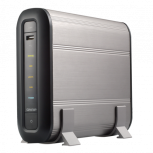
Qnap TS109

As the screenshot above shows the process of installing this SABnzbd+_0.4.11QPKG plug-in/package hanged at 50%. I reboot the NAS box, disabled SABnzbd+, reboot, removed Python package and reinstalled Pyton and SABnzbd+_0.4.11 but nothing helped. I even renamed the file as suggested in the support forms; still it did not helped. Tried with IE7 with WIndows XP; still it stopped at 50%.

Until I found a post that SABnzbd+_0.4.11 package may have a bug and try to go back to a earlier version. That’s what I did.

I found a post how to install the SABnzbd+_0.4.11.qpkg package without the web interface. Use putty.exe or ssh (mac/linux) and 22/ssh port and login. Go to your share where you stored the package and run it.

[/share/Qtemp] # sh SABnzbd+_0.4.11.qpkg
Install QNAP package on TS-NAS ...
qinstall.sh
SABnzbd+.tgz
4852+1 records in
4852+1 records out
qinstall.sh: line 79: qpkg.cfg: No such file or directory
Installation Abort.

As you can see it failed. Make sure you installed the IPKG QPKG package to run the following commands. Wget is needed to download remote files (ipkg install wget).

Update: 2 November 2009 –> I changed wrong hyperlink to 0.4.9 version and added unzip step


[/share/Qtemp] # wget http://ftp.qnap.com/QPKG/TS-109/SABnzbd+_0.4.9_TS-109.zip 
[/share/Qtemp] # unzip SABnzbd+_0.4.9_TS-109.zip
[/share/Qtemp] # sh SABnzbd+_0.4.9_TS-109.qpkg
Install QNAP package on TS-NAS ...
qinstall.sh
SABnzbd+.tgz
4794+1 records in
4794+1 records out
Link service start/stop script: sabnzbd.sh
Set QPKG information to /etc/config/qpkg.conf
SABnzbd+ 0.4.9 has been installed in /share/HDA_DATA/.qpkg/SABnzbd+.

Wow my SABnzb+ is working again and I can access the web interface on port tcp 8800. SABnzbd+_0.4.12 is released and no QPKG package so far but now I can do that from SSH shell.

[/share/Qtemp] # wget http://surfnet.dl.sourceforge.net/sourceforge/sabnzbdplus/SABnzbd-0.4.12-src.tar.gz
[/share/Qtemp] # tar -vxzf SABnzbd-0.4.12-src.tar.gz
[/share/Qtemp] # /etc/init.d/sabnzbd.sh stop
[/share/Qtemp] # cp -R SABnzbd-0.4.12/* /share/HDA_DATA/.qpkg/SABnzbd+/
[/share/Qtemp] # /etc/init.d/sabnzbd.sh start

Qnap TS109 SABnzbd 04.12 install

After two weeks no GUI interface I found a solution how to get my SABnzb daemon up and running with the latest version.

Qnap: Introducing the brand new GUI v3

Sunday, October 25th, 2009

Qnap released their new FIRMWARE V3 which brings the best user experience with the AJAX technology for their NAS users.


Qnap firmware v3

Firmware v3 features:

  • QNAP NAS now supports Virtual Disk which enables the NAS to connect to other iSCSI targets over the network by the built-in iSCSI initiator feature for flexible storage expansion.
  • EXT4 file system supports larger volume size (>16TB) and higher performance than EXT3. For more information, please visit http://en.wikipedia.org/wiki/Ext4.
  • With UPnP discovery, you can discover your NAS from any OS that supports UPnP. With Bonjour enabled, you can use the Finder to find the NAS or its services, e.g. AFP, on Mac OS X. There is no need to enter the IP address or configure the DNS servers.
  • QPKG: The QPKG software package platform enables the users to maximize the usage of Turbo NAS by installing additional software packages developed from the users and community worldwide. This can be done by simple click ‘download & clicking’ without going through any complicated process.
  • IP Filter/Network Access Protection: It’s simply the best anti-hacking solution that you will never want to miss.
  • IP Filter/Network Access Protection: It’s simply the best anti-hacking solution that you will never want to miss.
  • The NAS records all sorts of events such as system errors, warning messages, and connection logs. You can manage the log record by right clicking the logs and block the host IP address.
  • QFinder for Windows & Mac: The QFinder not only allows you to discover and configure your QNAP NAS, but also supports the other features, such as Wake-On-LAN (if applicable). And the brand new design QFinder4Mac is now available, a native OS X application for your QNAP NAS.
  • QGet for Windows & Mac: The QGet is simply the best client application for Download Station, which allows you to control your download jobs remotely.
  • The new UI supports popular browsers, including Microsoft Internet 7 & 8, Apple Safari 3 & 4, Mozilla Firefox 3, and Google Chrome.
  • The wizard guides you through the configuration process and makes it simple and fast.
  • Resource Monitor: Provides you the live view of the CPU Usage, the Disk Usage pie chart, and the bandwidth transfer statistics.
  • Get the latest news from QNAP such as up-to-date firmware, application and QPKG packages by the built-in RSS feed.
  • You can switch the display language of the GUI in a flash.
  • Select your favorite theme color for the web interface of the NAS. The settings will be applied automatically.
  • With real-time list search, you can find the specific user, group or share folder within just a second.
  • TwonkyMedia: TwonkyMedia works with DLNA-certified digital media adapters or UPnP AV-compliant devices, such as AV systems, TVs, PCs, game consoles and mobile devices (e.g. Apple iPhone).

List of features is so huge and unbelievable what the engineers of Qnap did. The upgrade on my TS-109 from v2 to 3.1.0 Build0708 went very smooth. The NAS box is even quicker.  Memory usage is still the same and with my config only 3MB free now.

If you own this piece of master work from Qnap please check their website and update you own NAS box.

To give you a better impression please see my screenshots below:

qnap1

a) When you enter the Qnap v3 Admin interface

qnap2

b) Qnap new AJAX login window and options to rember username and password. how sweat.

qnap3

c) QNap Turbo NAS Overview. New icons and interface which I really like. Super!

qnap4

d) Qnap Firmware Update screen

qnap5

e) Qnap Volume Management screen

qnap6

f) Qnap Network Service screen

qnap7

g) Qnap QPKG Plugins screen