
 Hi there! Welcome to my blog. My name is Ivan. I am a Dutch IT Professional working as Principal IT Consultant.
 How many of us have Windows Updates automatically configured and Virus Protection installed when using client OS virtual machines for test environments? I hope most of you because unprotected virtual machine in your enterprise environment has the same risk as a physical machine. There is no difference between a virtual or physical installation of Windows XP.
Recently I installed Symantec AntiVirus 10.2 on my Windows XP virtual machine. Hopefully the attach as shown below did protect me against the Adware which was installed on my virtual machine.
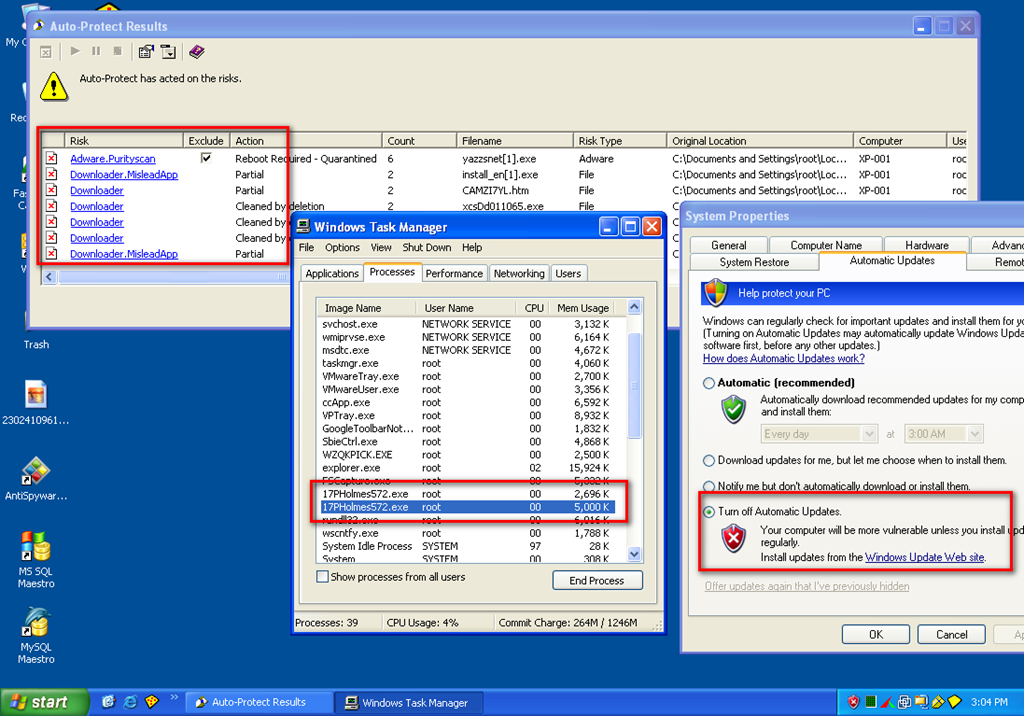
I was using couple of Internet Explorer sessions and searching for my phpmyadmin issues on one of my virtual machines. I used google and opened top 10 of the results. At some point I’ve got a popup of downloading a exe file when closing all Internet Explorer instances and then my Auto-Protect results came up with threads being found. I definitely did not install anything. After the reboot the “AntiSpyware Master” application was installed without my permission; believe as an IT and Security pro I am not going to install programs which I don’t trust.
The google search results for phpmyadmin related issues should not bring me to a malicious sites which uses the windows vulnerabilities of my virtual machine.
Top 3 security tips:
- Install AntiVirus software on all virtual machines; don’t forget to install that also for Linux based virtual machines. McAfee, Symantec,Kaspersy and NOD32 and couple to name. Use AVG if you want a free one.
- Download and install all Windows Security patches and enable Automatic Updates! For Linux make sure you update the linux distribution with tools like yum update or apt-get update+upgrade. Don’t forget applications like Flash player, Adobe Reader or WinZip; all applications are vulnerable at some point. For Windows scan the virtual machine with Microsoft Security Base Analyzer (MBSA)
- Don’t use the administrator account! With windows use the built-in runas feature and with Linux su


Leave a comment