Windows 7: Create a directory symbolic link to a network share
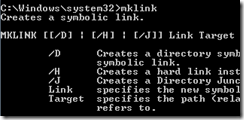
Mklink creates a symbolic link to a directory or file. This was a long-awaited feature in Windows and was already available on Unix and Linux systems.
Windows Vista introduced symbolic links, and Windows 7 lets us use them with libraries. Open an elevated command prompt, or you will receive this message:
You do not have sufficient privilege to perform this operation.
Open an elevated command prompt
- Click the Start button.
- Type cmd in the search box.
- Hold Ctrl and Shift, then click cmd in the results.
- Click Yes at the UAC prompt.
I want to create a directory symbolic link to a network share located on \\IP\Share.
Create the symbolic link
First, connect to the IPC$ share. My share is on a NAS without guest permissions, so the operation will fail without that connection.
| |
1 comment
Comments from the original WordPress site, kept read-only.
FYI not an "evaluated" command prompt, it's "elevated".