Exchange 2007: Management Shell cannot read the installed file version
 I received this error when opening the Exchange Management Shell and running a cmdlet:
[PS] C:\Documents and Settings\admin>Export-Mailbox -identity user1 -PSTFolderPath c:\user1.pst
WARNING: An unexpected error has occurred and debug information is being generated: Unable to determine the installed file version
from the registry key 'Software\Microsoft\Exchange\Setup'.
Export-Mailbox : Unable to determine the installed file version from the registry key 'Software\Microsoft\Exchange\Setup'.
At line:1 char:15
+ Export-Mailbox <<<< -identity user1 -PSTFolderPath c:\user1.pst
+ CategoryInfo : NotSpecified: (:) [Export-Mailbox], TaskException
+ FullyQualifiedErrorId : Microsoft.Exchange.Configuration.Tasks.TaskException,Microsoft.Exchange.Management.RecipientTasks.ExportMailbox
Restore the missing Setup registry key
The error suggested that something was missing from the Windows Registry. In Registry Editor, I browsed to HKEY_LOCAL_MACHINE\SOFTWARE\Microsoft\Exchange and found that the Setup key was missing.
The Exchange 2007 management tools were installed on a different server from Exchange itself. I logged in to the Exchange 2007 server and opened the same registry path. The Setup key was present there, so I right-clicked it and exported the branch.
I returned to the server with the Exchange 2007 management tools and imported the .reg file.
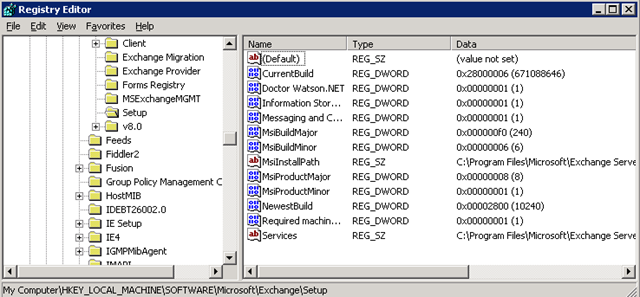
Importing the .reg file solved this problem. I then encountered another issue with the Export-Mailbox cmdlet.
1 comment
Comments from the original WordPress site, kept read-only.
Hi, thanks for the Exchange 2007 tips.