Windows Server 2003: Disable Internet Explorer Enhanced Security with a script
After six years of working with Windows Server 2003, I finally wrote this script to disable the restricted IE mode. In Windows Server 2008, this can be switched off in Server Manager. In Windows Server 2003, you still need to open appwiz.cpl and follow the steps.
This was the warning I saw repeatedly:
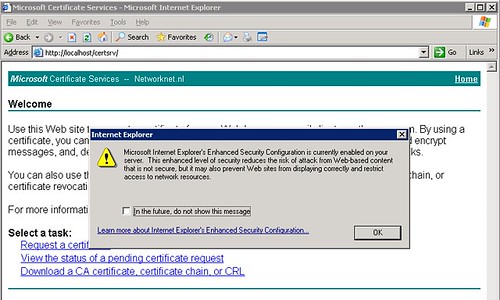
The warning makes sense, but it gets in the way when I need to update firmware or drivers, or work on a certificate authority, as shown in my example.
- Create a new file named "IE-Security.txt".
- Add the following text: [Components] IEHardenUser=Off IEHardenAdmin=Off and save the file.
- Save the file and run this from the command line: SYSOCMGR.EXE /i:%windir%\inf\sysoc.inf /u:c:\IE-Security.txt
This made my server less secure, but made these tasks easier to complete.
5 comments
Comments from the original WordPress site, kept read-only.
If you are going for most excellent contents like I do, just visit this web page every day because
it offers feature contents, thanks
I'm really enjoying the design and layout of your website.
It's a very easy on the eyes which makes it much more enjoyable
for me to come here and visit more often. Did you
hire out a developer to create your theme?
Excellent work!
Nice blog! Is your theme custom made or did you
download it from somewhere? A theme like yours with a few simple tweeks would really make my blog stand out.
Please let me know where you got your theme.
Thanks
It's going to be finish of mine day, but before end I am reading this enormous post to improve my knowledge.
whoah this blog is great i really like reading your articles.
Stay up the good work! You know, many persons are searching around for this information, you could help them greatly.