Windows Server 2003: Recover a system that could not start
Last night, my Openfiler iSCSI SAN failed with a “kernel panic” stop message. All virtual machines on that VMware ESX cluster froze. After finding the problem, I rebooted the Openfiler machine, and the server came back successfully. While checking the virtual machines, I encountered another problem with my development MS SQL server.
Just after POST, a black screen appeared and the boot process stopped. Unfortunately, I did not have a screenshot, but the message was something like:
The last time I encountered this problem, I could not fix it without reinstalling the OS. I had no recent backup and was running out of options for getting this virtual machine running again.
Attach the disk to another virtual machine
- Shut down the VM.
- Shut down another working VM.
- Mount the virtual disk of the failed Windows installation on the second VM and boot it.
- After Windows has booted on the second virtual machine, assign a drive letter to the failed Windows installation.
I went to E:\Windows\System32\config and got the following error message.

I right-clicked the volume, opened Properties and selected the Tools tab. I clicked “check now” to repair the volume. At 9%, I received a warning and the process stopped. I then remembered chkdsk.exe and ran it from the command line:
| |
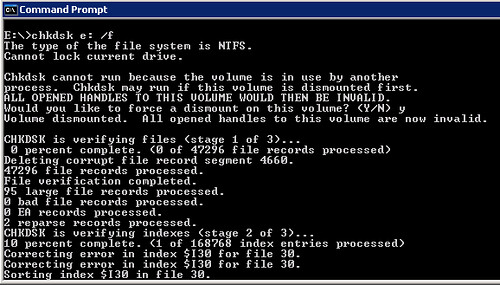
After the disk check finished, I could access all the folders. I shut down the virtual machine, disconnected the virtual disk and booted my development SQL server. After five minutes, the machine was up and running. This saved me at least a couple of days of work restoring the configuration and getting everything working.

Windows showed the warning " Windows - Registry Hive Recovered". I could log on to the server again and make sure a proper backup was in place. The same approach can be used with a physical disk, but the HDD needs to be installed in another machine.