Active Directory: Recreate NTDS links with KCC
If you are experiencing replication problems between domain controllers, this is a quick and dirty way to force NTDS topology updates. I usually encounter these problems when moving DCs between locations in my test environment.
Open “Active Directory Sites and Services”, locate the site and domain controller, open NTDS settings, and remove all connection links.
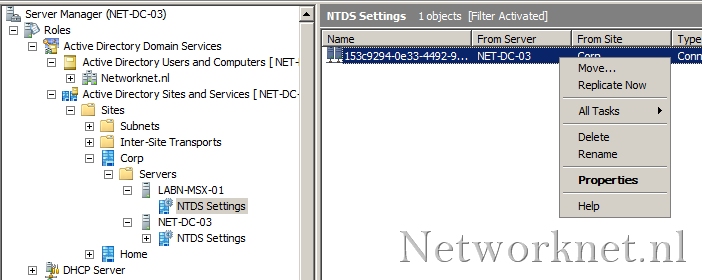
Open “Command Prompt” and run:
| |
This forces the KCC to recalculate replication topology for a specified domain controller. By default, this recalculation occurs every 15 minutes.
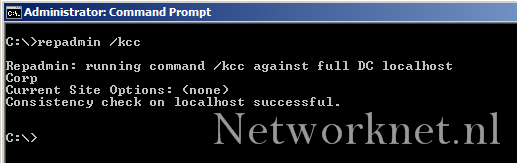
Wait a while, then check replication between your domain controllers.
Reference
1 comment
Comments from the original WordPress site, kept read-only.
ISSUES WITH WINDOWS TIME SYNCHRONIZATION ACCROSS VARIOUS SITES
Hi,
I would like to know if there is any free tool / application to sync time with AD server across various sites (Additional DC SERVERS/CLIENTS) - Additional DC's are in Hyper- V and the base machine that holds the Hyper -V machine is made to sync time from ADC inside them. A group policy forces AD time on all clients .
Time synchronizaton inside Hyper-V's had been disabled but still there is time synchronization issues. Manually running W32tm/resync and its variants to sync with main DC solves the issue for a while but it reappears now and then again.
Kindly suggest any and all alternative measures to combat this issue.