If you run a Windows Server 2008 VM as a domain controller with AD DS and install Exchange 2007 SP1 on the same machine, three services may fail to start. During boot, Active Directory Services are not yet ready, and some Exchange 2007 services fail to start.
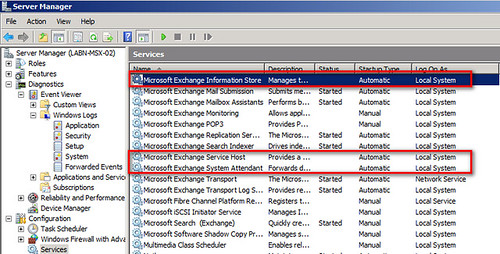
This is the Services console during my troubleshooting:
Microsoft Exchange Information Store, Microsoft Exchange Service Host and Microsoft Exchange System Attendant have not started, although their Startup Type is set to Automatic.
Recorded errors
The System log in Event Viewer shows these events:
Code4 lines
1
2
3
4
EventID 7024: The Microsoft Exchange Information Store service terminated with service-specific error 0 (0x0).
EventID 7009: A timeout was reached (30000 milliseconds) while waiting for the Microsoft Exchange Service Host service to connect.
EventID 7000: The Microsoft Exchange Service Host service failed to start due to the following error: The service did not respond to the start or control request in a timely fashion.
EventID 7022: The Microsoft Exchange Transport service hung on starting.
Exchange Management Console reports:
Code1 line
1
ERROR: Could not connect to the Microsoft Exchange Information Store service on server Networknet.nl. One of the following problems may be occurring: 1- The Microsoft Exchange Information Store service is not running. 2- There is no network connectivity to server Networknet.nl. 3- You do not have sufficient permissions to perform this command. The following permissions are required to perform this command: Exchange View-Only Administrator and local administrators group for the target server. 4- Credentials have been cached for an unpriviledged user. Try removing the entry for this server from Stored User Names and Passwords.
Delay the service startup
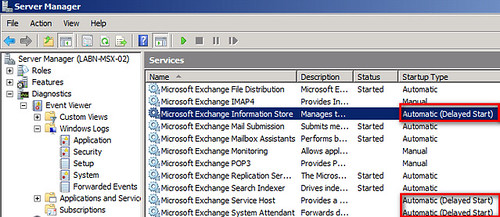
To fix the problem, change the Startup Type of Microsoft Exchange Information Store, Microsoft Exchange Service Host and Microsoft Exchange System Attendant to "Automatic (Delayed Start)".
Reboot the VM. The services should then start as smoothly as they would on two separate virtual machines.
Setting delayed start for the aforementioned Exchange services didn't fix the problem for us. It appears Exchange 2007 needs IPv6 in order to run on Windows Server 2008 unless you completely disable IPv6. Here's the steps:
Run: regedit or regedt32 HKEY_LOCAL_MACHINE\SYSTEM\CurrentControlSet\Services\Tcpip6\Parameters Create a dword (32-bit) value and name it as "Disabled Components" and then click OK Double click "Disabled Components" and type 0xffffffff(hexadecimal value) or 4294967295 (Decimal value) Note: The above value 0xffffffff(hexadecimal value) or 4294967295 (Decimal value) will disable all IPv6 components, except the IPv6 loopback interface.
Setting delayed start for the aforementioned Exchange services didn't fix the problem for us.
It appears Exchange 2007 needs IPv6 in order to run on Windows Server 2008 unless you completely disable IPv6.
Here's the steps:
Run: regedit or regedt32
HKEY_LOCAL_MACHINE\SYSTEM\CurrentControlSet\Services\Tcpip6\Parameters
Create a dword (32-bit) value and name it as "Disabled Components" and then click OK
Double click "Disabled Components" and type 0xffffffff(hexadecimal value) or 4294967295 (Decimal value)
Note: The above value 0xffffffff(hexadecimal value) or 4294967295 (Decimal value) will disable all IPv6 components, except the IPv6 loopback interface.
A Beginners' Guide to Facebook Enterprise Pages
Hello,
you just saved my life.
Thankkkkkkkkkkkkkkkkkkkkkkkkkkkkkkkkkkkkkkkkkks.
I love you man....