Windows Vista: Export wireless network profiles
When replacing notebooks at work or for friends and family, you always encounter the same problem after the new machine is ready. Most documents and user settings can be moved with tools such as ntbackup, robocopy or the Windows transfer wizards, but wireless settings may need an additional script.
I was recently asked to reinstall a couple of tools and migrate user documents and wireless settings. I received both notebooks without the wireless access point. After moving the important files and settings, I used netsh to export the wireless profiles to a text file.
Here is the process on my own Windows Vista notebook.
Export the profiles
Open CMD.exe and run:
| |
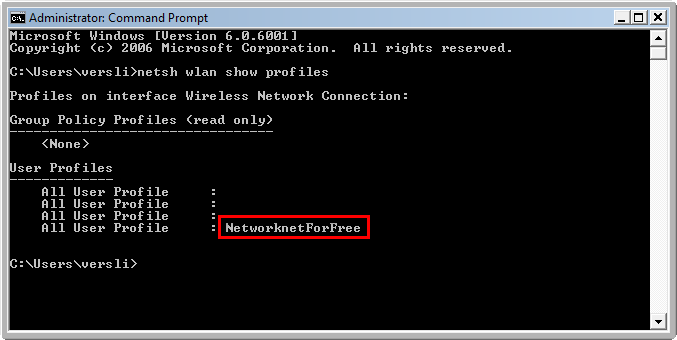
I want to export the “NetworknetForFree” WLAN profile so I can import it on another notebook. From the same command prompt, export it to C:\:
| |
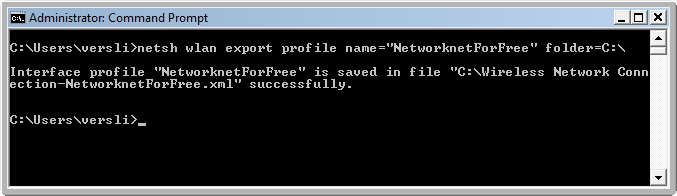
The profile is exported to C:\Wireless Network Connection-NetworknetForFree.xml, which I can copy to a USB drive. To export all wireless profiles, run:
| |
netsh generates an XML file containing the wireless profile settings.
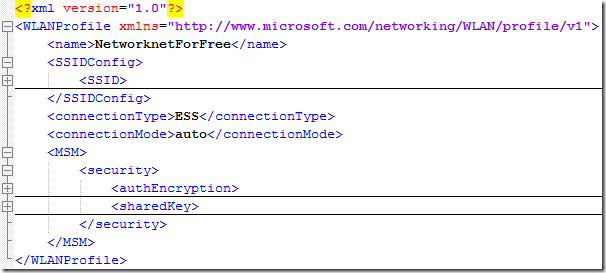
Import the profile
Open CMD.exe on the new notebook and import the XML file from the USB drive. You can first copy it to C:\ and then use this command:
| |
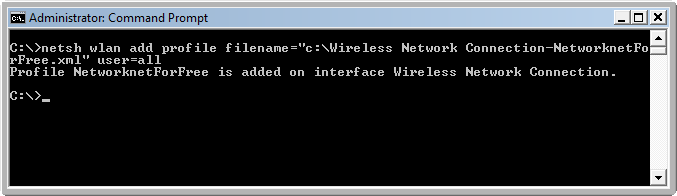
The “NetworknetForFree” wireless network was migrated without knowing the exact settings, such as the SSID, authentication type and password. I also tried these steps on a Windows XP SP2 client, but this feature is available in Windows Vista, not XP.
12 comments
Comments from the original WordPress site, kept read-only.
can't print this out - so it's worthless information.
Well is printing required to use this instruction? Not sure on your comment here from you.
Hey - thanks. This is going to save me a lot of hassle. WLAN's can be touchy at times to setup, but this nails it. Much appreciated !
nonameforu!
can't print out? what are you some sort of knob!
While this article says the password is included in the XML, when i add the profile onto a second computer it still requests the password to be entered..
I am having the same issue. It will not keep the key when importing. Does anyone have any idea why?
im getting fed up of this question being asked all and it being answered in the same way, and it never actually is answered correctly. all over the internet it's the same.
i want to move my profiles from my vista laptop to my new laptop, but guess what it doesnt have the same operating system it has Windows 7.
i export a wlan profile from vista - no problemo. i can reimport the same wlan profile xml file onto the same vista machine. no problemo. it reconnects. (useless for me).
which is great, fantastic. however i am trying to reimport all my profiles to a new machine running WINDOWS 7!!!.
i try to import the same file using the same cmd line but no it does not work. does not work. does not work!! it doesn't work, i have 10 years experience and i can getting anything to work when its meant to, this does not work.
so stop giving advice that it will work. it cant be done from vista to windows 7, using netsh commands. and i'd love someone to prove me wrong.
to further strengthen my findings; i MANUALLY connected the windows 7 machine to the same network as i was experimenting with on the vista machine.
i then exported the profile from the windows 7 machine (using the same commands).
i then opened, examined, and compared the two .xml files. one from the vista machine. one from the windows 7 machine. same wireless network. same WEP key. but low and behold when i examine the two xml files they have different contents in the tag. so unless windows 7 learns how to interpret Vista's encryption overnight this is never going to work.
so Microsoft in their wisdom have made Vista and Windows 7 incompatible in this way. well done Microsoft. you've made all our lives just that little bit harder
someone give me a real solution!!
@mattwilko
Nowhere in the article does it say you can migrate wifi settings from Vista to Win7. In fact it says this feature is "only for vista".
And yes, Microsoft products are totally inefficient in many ways, but what else are you going to do? Switch to Mac or Linux if you're that pissed.
Oh and demanding a solution in a COMMENT section of an article over 2 years old is stupid, stupid, stupid. With ten years of experience, you should know this.
Great information!
I was able to recover my internet connection using those commands.
Thank you for your help!!
Great information !! ty
@mattwilko
I am proving you wrong on your long extreme comment.
simply use "netsh wlan export profile key=clear" with command prompt running as administrator, and then import the xml file onto your windows 7 pc and CAZZAM. Windows 7 connects to the network.
I aam relly thankful to the owner off this website whho has shared this fantastic piece of
writin at at thiss time.