Dell PowerEdge 2600: installing a second CPU
Today, I planned to move some components from one of my two Dell PowerEdge 2600 servers to the other. I added memory, hard disks and a second Intel Xeon 2.4 GHz CPU.
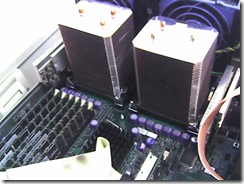
I powered on the server but saw no output on the monitor. I removed components one by one to find out why it would not boot: first the memory modules, then the hard disks and finally the second CPU. The server then booted as before. I added the memory modules and hard disks again, and it booted without any problems.
When I installed the second CPU again, the server did not boot. A Google search found nothing related to my problem. My last resort was the Dell support website. I logged in, entered the system tag and opened the system documentation.
After spending a couple of minutes reading the Microprocessor Upgrade Kit Contents section, I realized I had forgotten to add the VRM.
The voltage regulator module
The voltage regulator module (VRM) senses the microprocessor's voltage requirements and ensures that the correct voltage is maintained.
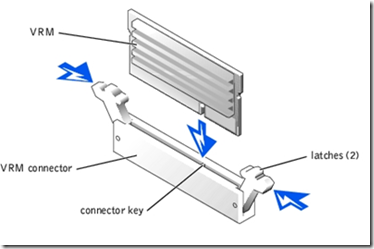
I installed the module in the second VRM connector and booted the system. It detected the second CPU.
1 comment
Comments from the original WordPress site, kept read-only.
What kind of socket it has? 603 or 604?