Internet Explorer 7: add your own search providers

I tried a couple of times to customize the IE search box with my own search providers. After reading about the AddSearchProvider Method on MSDN, I created providers for some of my favorite websites so I could use them from the search box.
Create a search provider
Below is the XML file I created for the Networknet.nl search provider. Create your own XML file and store it on your web server. Then create a button to add the search provider specified in that file.
<?xml version="1.0" encoding="UTF-8" ?>
<OpenSearchDescription xmlns="http://a9.com/-/spec/opensearch/1.1/">
<ShortName>Networknet.nl</ShortName>
<Description>Networknet.nl Blog Search</Description>
<Url type="text/html" template="https://www.networknet.nl/apps/wp/?s={searchTerms}&rls=com.microsoft:{language}&ie={inputEncoding}&oe={outputEncoding}&startIndex={startIndex?}&startPage={startPage}" />
</OpenSearchDescription>
<INPUT TYPE="button" VALUE="Del.Icio.Us by word" onClick='window.external.AddSearchProvider("http://www.networknet.nl/apps/content/searchproviders/del-icio-us.xml");'>
Find the search string for the website you want to query and add {searchTerms} in the XML file.
My search providers
| Search Provider | Click to add to your IE configuration |
|---|---|
 | |
 | |
 | |
 | |
 |
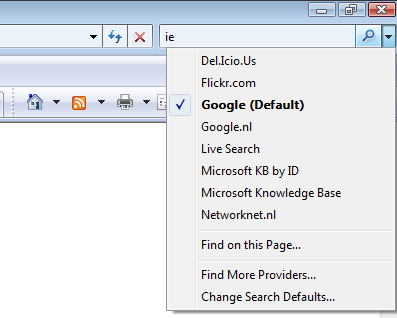
The result is shown below. In IE, press CRTL-E, type the word you are looking for and change the search provider.