Dell PowerEdge: check and enable Intel VT
Last year, I installed three Dell PowerEdge 1950 servers as VMware Server virtualization hosts. A couple of times, while creating and migrating VMs, I received a warning that the processors were not VT-capable or that the option was not enabled.
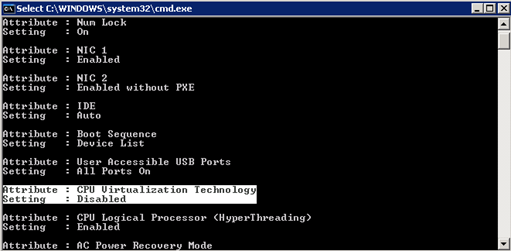
Enabling the option required a reboot, entering the BIOS with F2 and changing the Intel VT Virtualization Technology CPU setting. Each month, I planned a maintenance window to install missing security updates. I did not want to wait until that reboot to configure the options manually in the BIOS, so I created two scripts to check the processor specifications and enable VT.
The following scripts require Dell OpenManage software.
Check the processor settings
| |
Enable VT
| |

For more information, see this document. I ran the enable CMD script on my servers and waited for the scheduled reboot. After the reboot, the new settings were applied and VMware Server no longer displayed the warning.
9 comments
Comments from the original WordPress site, kept read-only.
Thank you so much for informaton on how to enable virtualization via OMCONFIG. I have several PE1950's and was worried how I would turn it on at our datacenter halfway across town in a punch to allow VMWware 2.0 to support a 64 bit host.
Hi,
It seems that there is no source code, code example for it.
I am tring to verify if the VT flag is disable / enable (on windows).
Code eample for this issue will be very halpful.
10X
On my search, yours was one of the pages that mentioned how to fix this setting. I have now enabled "CPU Virtualization Technology". Thanks.
It seems to me that the BIOS is not storing the VT setting on your systems. I checked my "PowerEdge 1950 III" and the setting was still on after a reboot, followed by a shutdown.
Does a later BIOS update fix this issue? What BIOS version do you have on those Dell 1950's? My BIOS version is 2.5.0
Hi there how do you get to the console to enter the command?
in this case I have DELL PE-2850.
Asaf, the 8 series Dells do not support intel VT so cannot support 64-bit guests.
You will need to find different hardware.
tks !!!!
Please note that the document you reference indicates that the dbs should be disabled. In your example you are enabling it.
i hope this command will work on windows server only where as i want check this informtion in bios whether the VT is enabled or not , some of the bios will not have this option ,for that we need to update the bios software , provided by Mother board comapany, VT is compulsary for installing esx servers
Thanks
Satish.P
Here is an easier way to check for VT or 64bit capability.
http://www.techxe.com/2010/10/27/how-to-check-features-of-cpu/