Hyper-V: Check CPU requirements on a Lenovo ThinkCentre M57
Microsoft’s Windows Server 2008 Hyper-V hypervisor has specific CPU requirements that must be met before the role can be installed:
Hyper-v requires specific hardware. You will need the following:
• An x64-based processor. Hyper-V will be available only in the x64-based versions of Windows Server 2008-specifically, the x64-based versions of Windows Server 2008 Standard, Windows Server 2008 Enterprise, and Windows Server 2008 Datacenter.
• Hardware-assisted virtualization. This is available in processors that include a virtualization option; specifically, Intel VT or AMD Virtualization (AMD-V, formerly code-named "Pacifica").
• Hardware Data Execution Protection (DEP) must be available and be enabled. Specifically, you must enable Intel XD bit (execute disable bit) or AMD NX bit (no execute bit).
Before downloading and installing the Windows Server 2008 x64 release-candidate builds, I suggest using CrystalCPUID to check which CPU extensions are available.
I ran the tool on a Lenovo ThinkCentre M57 6072-A5G with an Intel Core 2 Duo processor.
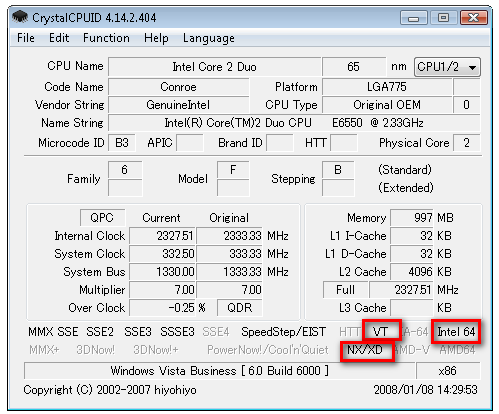
VT, Intel 64 and NX/XD extensions are marked.
1 comment
Comments from the original WordPress site, kept read-only.
Hi, revisiting an old post... I found one of these ThinkCentre PCs gathering dust and wanted to use it for a bit of testing. I don't know if you still have yours but if you do, do you know how to enable VT with the latest BIOS? There's no option after updating the bios and it seems to be disabled by default now... thanks!