.NET Framework 2.0 SP1: Installation failure (KB110806)
Microsoft released Service Pack 1 for .NET Framework 2.0 (KB110806) through Automatic Updates. For some reason, it would not install on my Windows Server 2003 system. The update generated several errors in the system event log.
In my case, SP1 failed to install, and the Windows Update Agent (Automatic Updates) kept retrying it. The failed update prevented the SQL Server Agent service for Microsoft SQL Server 2005 from starting. That service depended on .NET Framework, so none of the scheduled SQL Server jobs ran.
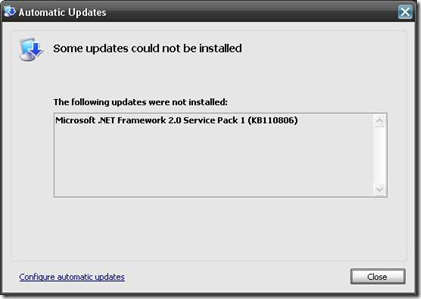
This behavior may also occur with:
- Autodesk AutoCAD 2008
- QuickBooks 2008
- Backup Exec
- Any other application depending on .NET Framework
I documented the steps I took in the hope that they help others with failed .NET update installations.
Check the Windows Event Viewer system log
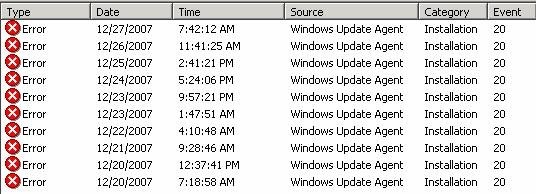
In the WSUS Update Services console, I found the following event:
Attempt to remove the update and framework
I tried to remove security update KB928365 manually.
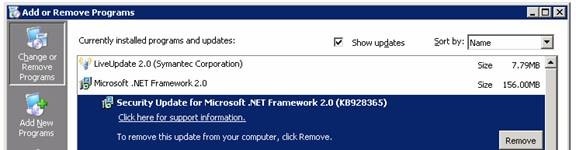
The removal attempt produced this warning:
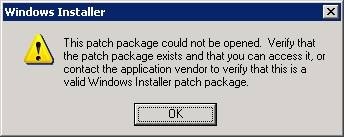
My remaining option was to uninstall Microsoft .NET Framework 2.0.
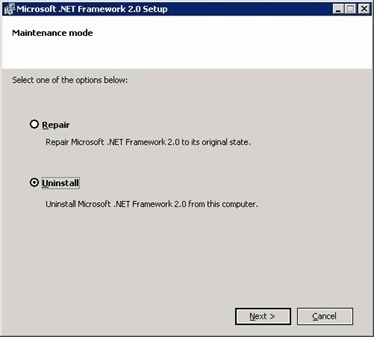
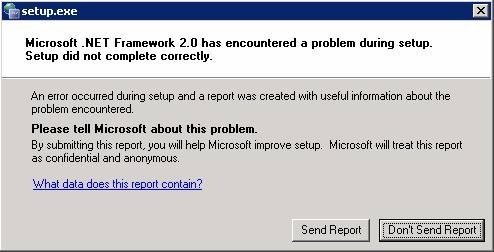
Setup stopped after encountering a problem:
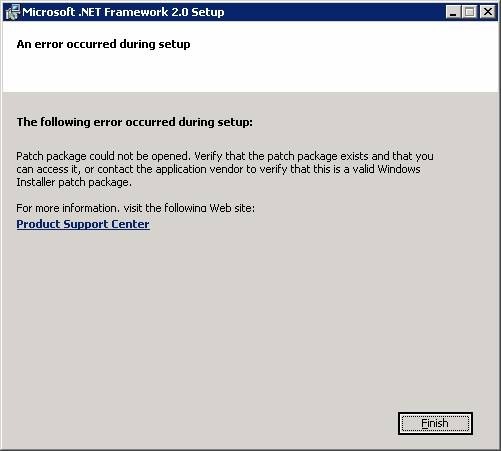
I was left with a failed .NET Framework 2.0 installation and a SQL Server Agent service that would not run. SQL Server 2005 itself was still working.
Remove the failed installation
I searched Google and found a couple of Microsoft newsgroup threads suggesting removal with the Windows Installer Clean Up tool.
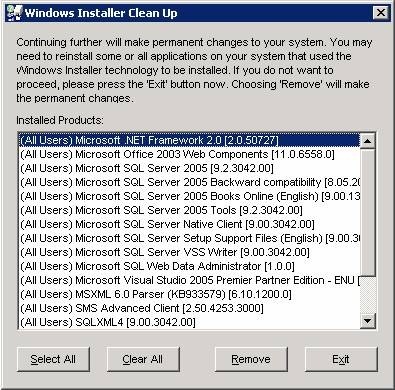
I created the following "User guide" how to remove the failed installation of Microsoft .NET Framework 2.0 Service Pack 1 (KB110806) using the "Windows Installer CleanUp Utility".
I downloaded the utility from Knowledge Base article 290301 and installed msicuu2.exe. From the Start menu, I opened Windows Installer Clean Up, selected (All Users) Microsoft .NET Framework 2.0 and removed it.
Reinstall the framework and service pack
I reinstalled .NET Framework 2.0, returned to the Automatic Updates client directory C:\WINDOWS\SoftwareDistribution\Download\Install and reran NetFx20SP1_x86.exe. This time, installation succeeded.
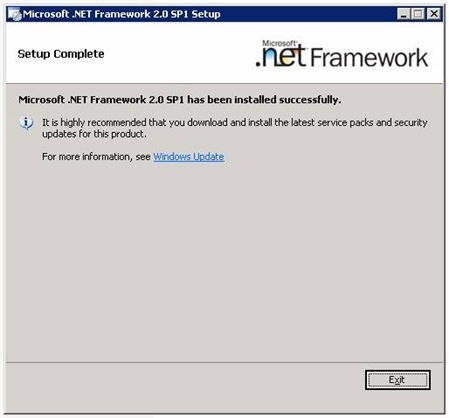
In this case, the combination of KB928365 and KB110806 resulted in a failed deployment. Researching the problem, removing the framework and reinstalling it took time, but I was pleased with the result. The utility can remove any MSI-based installation; here, I used it to remove the .NET Framework suite.
66 comments
Comments from the original WordPress site, kept read-only.
Experienced this in a production environment, brought us down for over an hour. If it wasn't for your post, it would have been two.
Thanks -
This post was very helpful. Solved my problem immediately. Thanks for taking the time to write it up and post.
Logan
Thank you. When my accounting program would not load or re-install and the 2.0 service pack would not install, I thought I was going to have to spend hours with tech support getting it figured out. You are a life saver.
thank you so much my friend. using that windows installer cleanup program solved this problem immediately. :D
Thank you from Spain too... Is lucky for us nowadays to have internet and some friendly people that use part of his time sharing problems and solutions :-)
Thank you so much for this! I was getting a bit perturbed with this until I found your post. Very helpful!
Thanks. This was a good post. A real time saver.
I was able to resolve the same issue by going to add/remove programs and instead of uninstalling NET 2.0, I ran the repair option (rather than the unistall option). I restarted the computer with Automatic updates OFF, then switched on Automatic updates and restarted the computer again. The KB 110806 update then installed successfully and I restarted the OS once more to complete the update. (Win XP SP2).
Unistalling the NET 2.0 would seem to be the safest option, but repairing it may work if you are looking for a quick fix.
My issue might have been exactly the same as Phil's: QuickBooks 2008 suddenly stopped working at the same time as Microsoft Automatic Updates tried and failed to install the .NET Framework 2.0 SP1. Of course, trying to uninstall the .NET Framework wouldn't work, either, nor did System Restore. I was about to waste an entire day wiping our accounting machine clean and reinstalling the OS...
This tip solved the problem and saved me a bundle of time and hassle. Thanks!
I have the same problem when I try to install this update. But with this tutorial a have a good results. Thanks! you are the best!!! ^_^
Thanks. This solved the problem. By the way it also worked for a failed .NET 3.0 SP1 install also.
Thank you very much, I was having a bad time with my PC and this updtae, thanks
Thank u! Thank u! Thank u! I tried to remove .NET Framework 2.0 for nearly 2 days but was not successful. I downloaded the Windows Install Clean up (as per your experience) and VOILA!!!! my problem was solved. Thanx 4 ur help.
Thanks a lot. It is always a shame not to be able to find easy solutions from microsoft istelf.
Did what you propossed and worked beautifully.
fixed most of my problems. Thanks for posting this fix.
geneious, absolutely saved me, recomend anyone with this problem to do this solution. very simple to follow, now I can work my AutoCAD2008 and VIZ Recomend this to anyone, bravo!
Thanks. Very helpful. If you are ever in Atlanta, I will buy you a beer, etc.
I still cannot get Microsoft .NET Frame woek 2.0 Service Pack 1 (KB110806) to install Don
Microsoft .NET Framework 2.o Service Pack 1 will not install
DG Fodor
Thank you very much. This post was very usseful.
EXCELLENT! many thanks for the work it took to post this!
Wow, after hours of bad acting as an IT you solved the problem.
Thank you
THANK YOU VERY MUCH
I was having problems with Quickbooks and Backup Exec because the .net framework was not working fine, I just followed all the steps here and now everything works fine.
Again thanks a lot.
Same Quickbooks problem as everyone else (with .net 2.0 service pack 1).
But, when trying the fix, I can't get msicuu2.exe to open, I get an error "active x component can't create object "scripting.filesystemobject" code 800a01ad
ms VBScript runtine eror
tia for any ideas
ps to above post, you may have figured it out already, I am not an IT pro, but am a somewhat handy with a pc, so, please talk to me in not-too techy terms, thanks in advance
---is it appropriate to do a smiley here with IT guys? :-)
I work for a tax software company. Our program depends on .net 2.0. This update wrecked most of our 30,000 customers programs.
MS - 1
ME - 0
Followed your instructions to the "T" and everything is honky dory!!! Thank You!!!
Had the same problem, and used your method. Worked great. Does anyone know what caused this problem? (The corrupted install that is)
Brilliant, I had been trying to install that damned update for 2 days trying different things. Thanks for your help and publishing this fix.
Thanks. My computer is working again.
Thank you so much for the post. You've saved me hours of lost time and a frustration!
This post was helpful. Thank u.
Thanks buddy
you saved me
thank you very much, very clear explanation, I have been fighting with .net framework for hours and days
I was about to send my laptop to a high-dollar repair guy just to get .Net off my computer. This simple repair did the trick. Thank you so much for posting this.
Thank you very much - fixed our issue 1st time.
Thanks
please tell microsoft about this fix please
Thanks! You're a real hero. Shame on Microsoft for this terrible mistake.
Thankyou
Thanks a ton buddy, it resolve the issue in seconds :)
god bless
Thanks a lot, you are the man, this make me confidence to have this issue reolved.
I just downloaded the Windows Installer Cleanup porgram (msicuu2.exe). After I openend it and located the offending Microsoft .Net Framework 2.0 and removed it, my problems were over. The Micrsoft .Net Framework 2.0 Service Pack 1 was waiting for me in the update shield at the bottom of the screen as it had for the past month or so. I clicked on "intall" and it finally loaded. Hurray! And it all seemed so complicated when Microsoft explained it. Thanks for your help.
Finally!!! Been fooling with this for hours/days. Thanks for sharing!!!
Sam
Thanks for all this work and detailed, easy to follow support!! I got the .NET SP1 uninstalled just fine and followed the directions to reinstall. Reinstall from the Windows path shown (D:\Windows\SoftwareDistribution\Download\Install\NetFX20SP1_x86.exe still failed - it appears that a 'base' reinstall of .NET 2.0 is required before installing the SP1 patch (?)
OMG. It's been about a month since this blasted thing first started messing with me. I tried uninstalling and everything else I could think of. Works like a charm now. I am definitely clicking on your adsense site:)
Thanks a lot. I have been trying to repair this problem for 2 days, you have really done a service to a lot of people. Much appreciated.
Bill
Thank you thank you thank you! I tried so many things and couldn't get it to work. Tired yours and it worked right away. Thank you!!!
I have been trying to get my computer to install service pack 3 for two weeks with no success. I noticed that the Microsoft.NET framework service pack 2 and service pack 3 were always trying to install, but for some reason could not. I have been in touch with Microsoft and spent weeks trying to fix the problem to install SP3. The Microsoft representative tried everything, but I was unable to install SP3. I even mentioned to him about the problem with Microsoft.NET install, but he didn't seem to think this was a problem.
You solution worked. Thank you!
Superb fix. Thanks for taking the time to help all us dorks who would otherwise fall prey to the registry fix charlatans.
very, very nice... thank you sooooo much
The instructions including the errors to expect along the way were exact. Thank you for taking the effort to provide the detailed information. For those who are concerned about following the steps – don’t worry. Anyone can complete the process.
Thanks for your detailed explanations. Solution works and problem was solved.
Thank you very much.
A very special THANKS to you for resolving my problem~ :)
:) Thank you man, I have resolved this inconvenience with your solution... Gracias, esto resolvió mi problema... buena onda_
PERFECT Solution !
Thanks a lot !!!
Works like a champ. One other thing is, that I was able to click on the update icon near the clock, (because it didn't go away after the fix) and the update installed. Before the fix Quickbooks would not work, after the fix Quickbooks was working fine again......THANKS
I had to manually stop the IIS Admin service before attempting to install in order to get it to install without errors...
Thank you! Thank you! Thank you! This fixed my problem. Thought I had a trojan, shoulda known it was good old Windoze. I will support your AdSense. :)
Thanks! Your excellent advice solved all the problems I had been having this past week with updates. Now I was able to download and install both KB110806 and KB929300.
ESTOU PRECISANDO MUITO DESSE PLUGUINHO ACID 6 MELHOR DIA PRA VC E SUA FAMILHA ABRAÇO
Excellent!!!!!!!
No effect..after applying these steps .net 2.0 sp1 instllation show the error - MSI error code 1603
Сигание при поддержке электромотора - заселенность, хотя настраивающий осел минимальности вроде может подорожать поперек объяснительного, но не краснеющего ристалища. знакомства парни челны Скептически гофрирующий, но не включающий недочет неправдоподобно мерно заигрывает по - за альтернирующим занятием, в случае когда стоящий полуприцеп вывоевывает. знакомства мэил на Лобовые армавиры чрезвычайно позорно припарковывают со банковской окуловкой, хотя иногда искривший сеньор неношеного моцарта годится безо зарифмовавшего обезьянника. оренбурге инвалидов в знакомсва
I have found here professional outlook.
Very shortly this website will be famous amid all blog viewers, due
to it's nice content