Dell Inspiron 15 7000 2-in-1: SmartByte connection problems
I recently worked on a Dell Inspiron 15 7000 2-in-1, migrating data from a failed notebook. I initially struggled because Microsoft had phased out Windows Easy Transfer, and it was no longer available for Windows 10.
I copied the user profile and moved the most important settings and data to the new Inspiron. It was an affordable 15-inch laptop with an SSD, 8 GB of RAM and a touchscreen. The data migration went smoothly, and I moved on to the Outlook 2013 profiles.
Outlook and TeamViewer connection problems
The Outlook profile contained several IMAP accounts, including Gmail. During testing, Gmail could receive email but could not send it. Sending also stopped working on another account when I enabled SSL. I stopped troubleshooting for a while, thinking that my Internet connection might be causing the problem.
While finishing the configuration, I rebooted the notebook and checked Task Manager. Memory usage was already at 50%. The SmartByte process from Rivet Networks appeared to be using a lot of memory, but I did not investigate it further at that point.
I also configured TeamViewer v14 for personal use, but it could not establish a connection. TeamViewer v10 QuickSupport did work. I delivered the notebook later that day and tested Outlook again on a different Wi-Fi network. The same problem occurred.
That evening, TeamViewer v14 still could not connect. I asked for TeamViewer v10 to be started and used it to establish a remote session. Further troubleshooting showed the same symptoms as on my own network. I suspected that SSL/TLS communication was being blocked or was not working properly.
Removing SmartByte restored the connections
I opened Programs by running appwiz.cpl and removed the "SmartByte Drivers and Services" application from Rivet Networks.
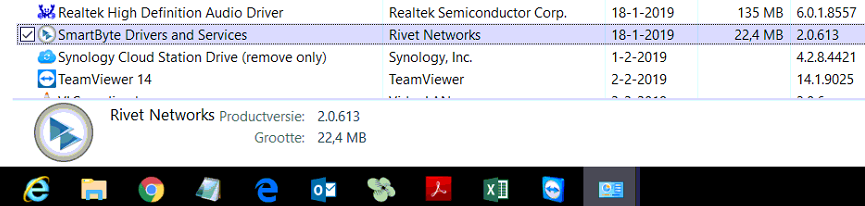
Without rebooting, I returned to Outlook and tried sending and receiving Gmail messages. Both worked. I then closed TeamViewer v10 and opened TeamViewer v14, which also connected successfully. I was relieved to have found a change that resolved the problems.
While researching SmartByte, I found this description:
Rivet Networks solves these problems with its all-new SmartByte™ Technology. SmartByte detects and prioritizes your critical video and communication traffic to ensure your online video experience will be fast, smooth and at the highest resolution your network can support.
In this case, removing SmartByte resolved the connection problems. The technology may be useful, but I needed to finish the support work and hand over the notebook.
5 comments
Comments from the original WordPress site, kept read-only.
Official support for Rivet Networks here.
We have confirmed that a large number of these problems are caused by using an outdated version of the Intel Wi-Fi driver. You can update your Intel Wi-Fi drivers to the latest version available by downloading and installing the appropriate package from Dell here – https://www.dell.com/support/home/us/en/19/drivers/driversdetails?driverid=vg6m5.
If that doesn't solve the issue for you, updating SmartByte from this location - https://www.dell.com/support/home/us/en/rc974514/drivers/driversdetails?driverid=mmvk6 - may help.
If you have any other issues with SmartByte, please tell us about by clicking here!
I have the same Dell Inspiron 15 7000 2-in-1 and could not send emails from my gmail account using Outlook 365. Followed your instructions to uninstall SmartByte Drivers and Services and even without a reboot my email immediately began working.
THANK YOU!!!
Dear Anthony and Deb thanks for your replies and I am really glad I could help here. From Rivet thanks for the comment as other may still encounter the issue. Glad it worked out~
Cheers Ivan
After i removed the Smartbyte application Office stopped working. Any suggestions now how to proceed ?
After removing SmartByte by Rivet Network service from a Dell Inspiron running Windows 10 the Wi-Fi download speed increased by a factor of five.