Office 365: Outlook 2016 password prompts in an Exchange hybrid environment
Outlook prompted for a password when a user tried to open a resource calendar that had been migrated to Exchange Online. The user's mailbox was still on the on-premises Exchange server, while the resource mailbox was now in Exchange Online.
The Windows Security dialog showed "Windows Security - Microsoft Outlook connecting to …"
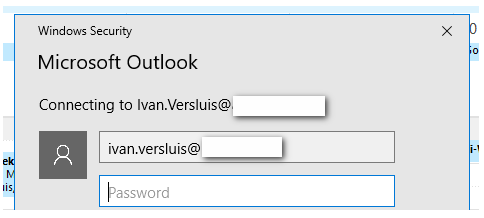
Following the authentication request
Inspecting the HTTPS traffic with Fiddler or a similar tool shows Outlook being redirected to Exchange Online through Autodiscover. This happens when opening the calendar from the address book or using the cached entry.
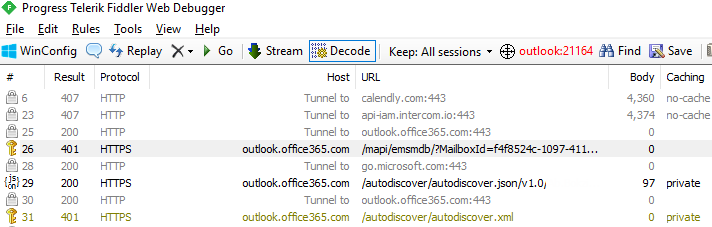
The request to https://outlook.office365.com/mapi/emsmdb/?mailboxId= returned HTTP 401 Unauthorized:
| |
Enabling modern authentication for Autodiscover
After several hours of analysis and troubleshooting, I found the issue. I was using Outlook 2016 from an Office 365 ProPlus installation. My mailbox was on the on-premises Exchange server, and I was trying to access a service in Exchange Online. The connection needed modern authentication or prompted me to enter credentials and save them locally. Saving the credentials worked, but I did not want to rely on that in a large enterprise environment.
In this configuration, Outlook limited its authentication choices to the schemes supported by RPC, which did not include modern authentication. I resolved this by adding the following registry setting to the user profile. This applied to Outlook 2013 and Outlook 2016; Outlook 2010 did not support modern authentication and still required a username and password.
- In Registry Editor, locate
HKEY_CURRENT_USER\Software\Microsoft\Exchange. - On the Edit menu, point to New, then click DWORD Value.
- Type
AlwaysUseMSOAuthForAutoDiscoverand press Enter. - Right-click
AlwaysUseMSOAuthForAutoDiscoverand click Modify. - In the Value data box, type
1and click OK. - Exit Registry Editor and restart Outlook.
This was a significant issue for the migration project. Some locations were still using on-premises Exchange, while others had migrated to Exchange Online. The registry change helped me avoid additional helpdesk questions and user communication during the migration.
References
2 comments
Comments from the original WordPress site, kept read-only.
Hi There
We are facing the exact same Issue. Thought setting the registry key for an Outlook 2016 client did not solve the issue. We still get prompted with passwords both for the user mailbox and any other attached shared mailbox located in Office365. Do you have an idea what further steps could be done?
Thanks a lot,
Luca
For us turning on modern authentication and upgrading our Office Setups to Office 2016 has fixed the issue.