SCCM 2007: Install prerequisites on Windows Server 2008 R2
SCCM 2007 has prerequisites that must be installed before setup. I am installing SCCM 2007 SP2 on a Windows Server 2008 R2 virtual machine, my second SCCM 2007 server in the lab. The next installation will be the final one, and I want to automate its prerequisites with a script.
Windows Server 2008 R2 provides dism.exe for installing roles and features. I ran dism /online /Get-Features /format:table on my first server and copied the output into Excel. With formatting and functions, I generated the command needed for the new SCCM server.
Install the prerequisite roles and features
Run this command from an elevated administrator command prompt:
| |
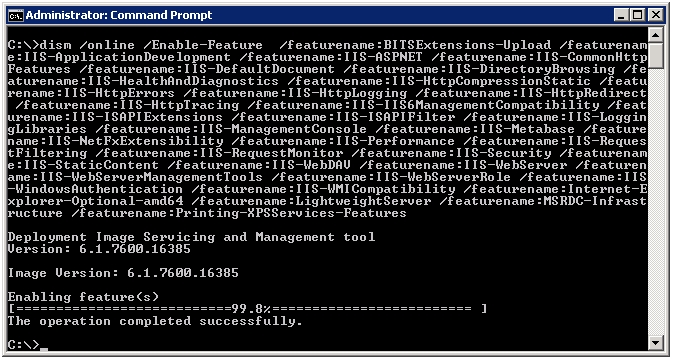
When I ran the Configuration Manager 2007 SP2 prerequisite checker, only Windows Server Update Services (WSUS) was reported missing. That was acceptable for this installation because I was not installing the Software Update role.
Configure IIS WebDAV
Enable and configure the IIS WebDAV Authoring Rules before starting.
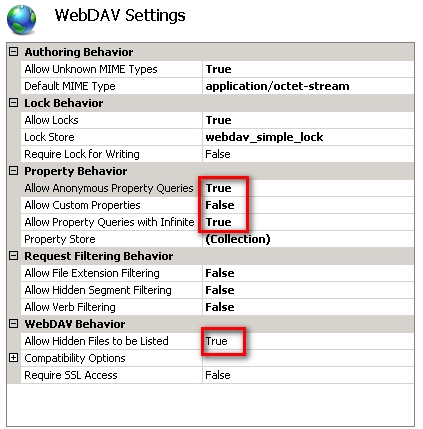
The TechNet article below provides more details on the WebDAV Authoring Rules.
Reference
3 comments
Comments from the original WordPress site, kept read-only.
If you need to install sites regulary, then there is a better way: http://configmgrpsh.codeplex.com/
Thanks MM. I am new with SCCM 2007 rollout. My way worked fine for now.
I will look into the script and learn my missing steps. Again thanks a lot for sharing this with me and others who will read this post.
I already have a Windows Server 2008 R2 DC as my schema master. Will like to install SCCM 2007 32bit on Windows 2003 member server
Can someone help with the prerequite on Windows Server 2008R2