App-V: Stream virtual applications from a file share
App-V supports several options for streaming an SFT deployment file. RTSP, RTSPS, FILE, HTTP and HTTPS are available for the Server URL.
I currently use RTSP and am evaluating the FILE option to store virtual packages on a file share. I want to replace the App-V streaming servers with file shares.
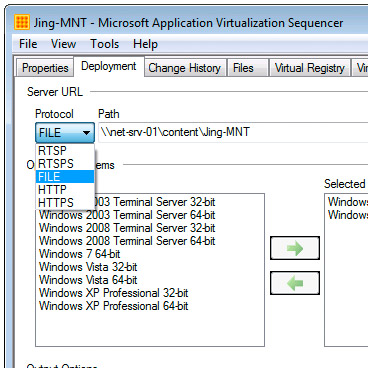
I imported my new Jing virtual application into the App-V management server and refreshed my local App-V client to publish it.
The icon appeared on the desktop. When I opened the shortcut, I immediately received the following "Application Virtualization Error".
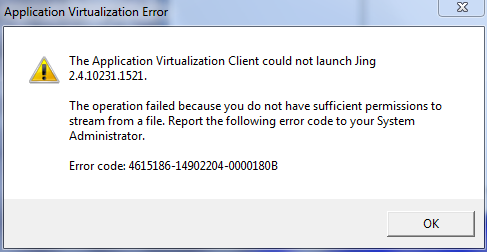
AllowIndependentFileStreaming had not been set when the App-V client was installed.
To allow streaming of an SFT file from a file share, change the following registry value to 1 and restart the "Application Virtualization Client" service.
| |
I used the following script to update my clients and allow FILE streaming:
| |
References
1 comment
Comments from the original WordPress site, kept read-only.
If you are still publishing from the App-V server, I don't see the point. RTSP will support disruptions in the streaming process that CIFS will not. Even if you do want to go that way, I would recommend a client ASR ("FILE:\\server\share") override in the client registry while keeping the OSDs pointing to RTSP (makes it easy to cut over without editing the packages, and to change back). You still need the registry setting you identified at the client. In either case, with file: you still get the app fully cached (whether created with a small FB1 or not), and a form of "active update". The kicker is that you can't replace the file on the server without a maintenance window, and is better not to have the _2.sft naming.
If you do get rid of the App-V server completely, then you will also need to disable RequireAuthorizationIfCached setting, and probably set LimitedDisconnection timer to zero (although I am unclear if that last one is truly needed), and possibly add permissions depending on how you get the virtual apps there. Stand-alone client is a great way to go!