
 Hi there! Welcome to my blog. My name is Ivan. I am a Dutch IT Professional working as Principal IT Consultant.
 For weeks my local Infopath 2007 installation failed to open forms located on SPS server. See warning below.
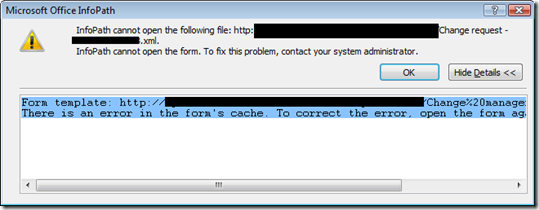
InfoPath cannot open the following file: http://sharepoint/ChangeMgmt/Forms/abc.xml InfoPath cannot open the form. To fix the problem, contact your system administrator.
Form template: http://sharepoint/ChangeMgmt/Forms/solution.xsn. There is an error in the form’s cache. To correct the error, open the form again.
This was my solution is solving the problem. Before you start clean the Internet Explorer Cache!
For Windows Vista
- Locate C:\Users\%Username%\AppData\Local\Microsoft\InfoPath\FormCache2 and delete complete folder. If this fails than rename the subfolders to something else like abc and try again. I got a warning and the action failed if I did not rename the folder.
- Run C:\Program Files\Microsoft Office\Office12>INFOPATH.EXE /cache clearall
For Windows 2000/XP
- Locate C:\Documents and Settings\%Username%\Local Settings\Application Data\Microsoft\InfoPath\FormCache2 and delete the folder.
- C:\Program Files\Microsoft Office\Office12>INFOPATH.EXE /cache clearall
After these steps my Infopath forms opened again 😉


Kevin
THANKS!!!