
 Hi there! Welcome to my blog. My name is Ivan. I am a Dutch IT Professional working as Principal IT Consultant.
 If you are deploying SAP GUI 7.10 with Business Explorer component the Analyzer toolbar may not work with Microsoft Excel 2003. After you start the Analyzer; Excel application is started and toolbar displayed as below in German. I installed the latest release of SAP Gui 7.10, BW 3.5 and BI 7.0 with bw350gui710_3-10004473.exe and bi710sp05_500-10004472.exe patch on a Windows XP SP2 client and Office 2003 SP2.
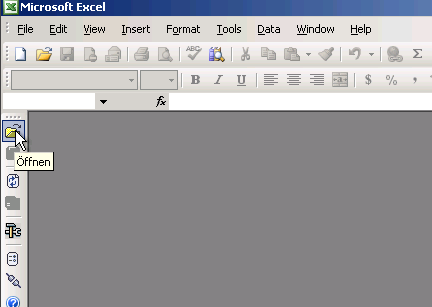
To fix this problem please make sure you install the “Update for Office 2003 KB907417“.
Microsoft has released an update for Microsoft Office Excel 2003 and for Microsoft Office Word 2003. This update corrects a potential problem in which an add-in, a smart tag, or a smart document may not load if the add-in, smart tag, or smart document uses the Microsoft .NET Framework 2.0.
When you try to run a custom Microsoft Office 2003 solution that was created by using Microsoft Visual Studio .NET, the solution does not run. This issue may occur because the Microsoft .NET policy that enables the custom solution to run is not loaded after you install Visual Studio Tools for Office 2003.
Download and install the hotfix and reboot after. After reboot the BEx Analyzer toolbar is working. If you are deploying this on many clients please make sure this update is installed before SAP GUI installation.
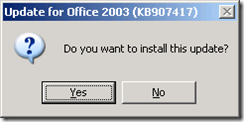
After the reboot the toolbar is working.

Credit goes to “Steven Glennie” for pointing me in the right direction when troubleshooting this problem.


Clive Govinden
Hi guys – I am an IT Engineer at Anglo Vaal Industries (SA). I have the exact same problem with numerous users however their BEX 7 has to integrate with Office 2007. I do have users with Office 2007 and the MS patch prescribed works perfectly on Office 2003 but not on Office 2007. I have service pack the GUI to patch level 8 and BEX with SP5, I even tried service pack 3 for Windows XP and I service packed Office 2007 with service pack 1 – I have installed .Net Framework 1,2 & 3. I have searched the web but theres no patch like the one that works with Office 2003 – PLEASE HELP!!!
Clive Govinden
I have figured out the problem with Office 2007
• Office 2007 –
o before setup for Bex ensure Dotnet framework 2 and SP1 for Dotnet 2 is installed
o Re-install SAP
o Existing broken installs – Install Dot net Framework2.0 SP1; if does not resolve; redeploy SAP – Regards Clive Govinden
fernando
Hola :
La solución que plantean fué efectiva. Porfin logré ejecutar el analyzer.
Muchas Gracias
Monica
Hola vi que hablas español me podrias ayudar, tengo problemas con analyzer venia trabajand con office 2003 y me pase al 2007 y hasta ahi llegue. Ya no me funciona alcanzo a introducir el Mandante, el usuario la clave pero se me cierra.
Si me puedes ayudar te lo agradezco.
Slds
Mónica
Olivia Dacshberger
Hi There
I have recently upgraded to Office 2010 and fine that when using BEX I am unable to access workbooks. I am able to access queries – but all workbooks have an error message stating
“cannot open the workbook as it is corrupt”. although my colleagues on 2007 office are able to open the same workbooks. This is for Release 7.10 gui. with support pack 11 release 1606. Please advise if there is a patch I need to load to overcome this problem.
Kind Regards Olivia
Ivan Versluis
Dear Olivia,
I am currently working on a Windows 7 installation and having SAP GUI loaded on it.
Please make sure you download the latest version of SAP GUI and Business Explorer which is version 7.20 Patch 1. This version has been approved by SAP to work with Win7 and Office 2010.
With kind regards,
Ivan Versluis
venkat
How to add Image populator tool as an add-in to the bex analyzer. Please let me know the procedure and installation paths . ASAP