
 Hi there! Welcome to my blog. My name is Ivan. I am a Dutch IT Professional working as Principal IT Consultant.
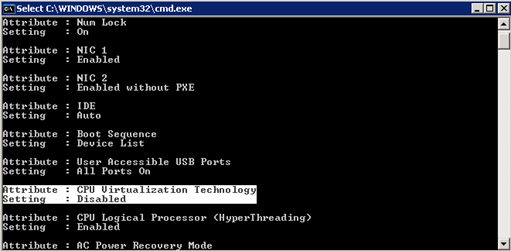
 Last year I installed three Dell PowerEdge 1950 servers, these servers were running as VMWare Server virtualization hosts. Couple times when creating and migrating some VM’s a warning was displayed that my processors where not VT capable or this options was not enabled.
To enable this option a reboot was needed, enter the BIOS (F2) and change the Intel VT Virtualization Technology CPU setting. Every month I planned s a scheduled maintenance window to install missing security updated, and I didn’t want to wait for that reboot and manually configure these options from the BIOS. I created two scripts to check the processor specifications and enable the VT option for the processor.
To run the following scripts Dell OpenManage software is required.
@echo off
REM Ivan Versluis / www.networknet.nl / Dell PowerEdge Intel VT check
omreport chassis biossetup & omreport chassis processors
@echo off
REM Ivan Versluis / www.networknet.nl / Dell PowerEdge Intel VT enable
omconfig chassis biossetup attribute=cpuvt setting=enabled
omconfig chassis biossetup attribute=dbs setting=enable
pause

For more information check out this document. I run the enable CMD script on my servers and waited for the scheduled reboot. After the reboot the new settings was applied and I didn’t get the warning from VMWare Server.


Chris
Thank you so much for informaton on how to enable virtualization via OMCONFIG. I have several PE1950’s and was worried how I would turn it on at our datacenter halfway across town in a punch to allow VMWware 2.0 to support a 64 bit host.
Levi Aasf
Hi,
It seems that there is no source code, code example for it.
I am tring to verify if the VT flag is disable / enable (on windows).
Code eample for this issue will be very halpful.
10X
Rob
On my search, yours was one of the pages that mentioned how to fix this setting. I have now enabled “CPU Virtualization Technology”. Thanks.
It seems to me that the BIOS is not storing the VT setting on your systems. I checked my “PowerEdge 1950 III” and the setting was still on after a reboot, followed by a shutdown.
Does a later BIOS update fix this issue? What BIOS version do you have on those Dell 1950’s? My BIOS version is 2.5.0
Asaf
Hi there how do you get to the console to enter the command?
in this case I have DELL PE-2850.
James
Asaf, the 8 series Dells do not support intel VT so cannot support 64-bit guests.
You will need to find different hardware.
Rogerio
tks !!!!
Mark Mathers
Please note that the document you reference indicates that the dbs should be disabled. In your example you are enabling it.
satish
i hope this command will work on windows server only where as i want check this informtion in bios whether the VT is enabled or not , some of the bios will not have this option ,for that we need to update the bios software , provided by Mother board comapany, VT is compulsary for installing esx servers
Thanks
Satish.P
techxe
Here is an easier way to check for VT or 64bit capability.
http://www.techxe.com/2010/10/27/how-to-check-features-of-cpu/