Microsoft .NET Framework 2.0 Service Pack 1 (KB110806) failed

Ivan Versluis December 27th, 2007

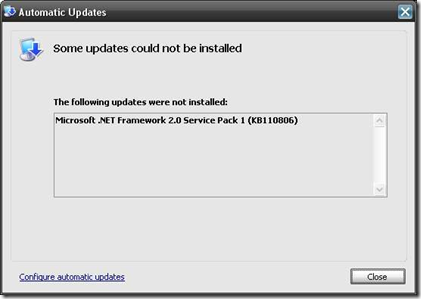
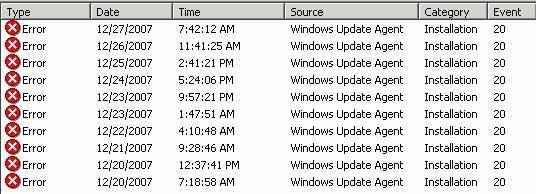
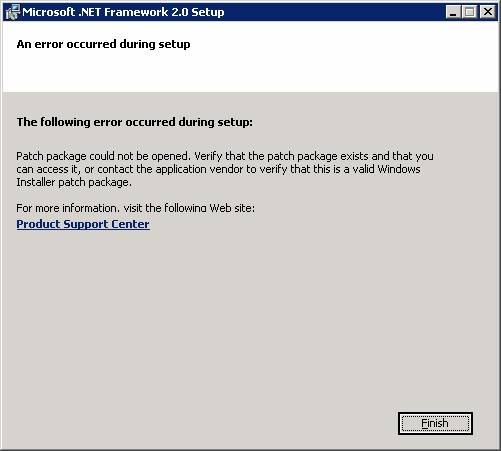
Last year Microsoft released their Service Pack 1 for Microsoft .NET Framework 2.0 (KB110806). For some reason the Service Pack 1 did not install and generated  a lot of error messages in the system eventlog or displays the illustrated screenshot below. In my case the SP1 update failed and the Windows Update Agent (Automatic updates) retried to reinstall constantly; because the failed  the production Microsoft SQL Server 2005 server failed to start the “SQL Server Agent” service which is depending on the .NET Framework many of the scheduled jobs failed to run.

Automatic Updates - Microsoft .NET Framework 2.0 Service Pack 1 (KB110806) were not installed.

Screenshot 1 - Automatic Updates - Microsoft .NET Framework 2.0 Service Pack 1 (KB110806) were not installed.

This behavior may also occur with:

  • Autodesk Autocad 2008
  • Quickbooks 2008
  • Backup Exec
  • Any other application depending on .NET Framework

If you are a novice user than read my “User guide” below how to remove the failed installation of Microsoft .NET Framework 2.0 Service Pack 1 (KB110806) with “Windows Installer CleanUp Utility”.

I start to troubleshoot and hopefully these steps will help you fixing your installations.

Check the Windows Eventviewer System

Event Type: Error

Event Source: Windows Update Agent

Event Category: Installation

Event ID: 20

Date: 12/20/2007

Time: 7:18:58 AM

User: N/A

Computer:

Description:

Installation Failure: Windows failed to install the following update with error 0×80070643: Microsoft .NET Framework 2.0 Service Pack 1 (KB110806).

clip_image001

Error message in the Update Services mmc console.

Microsoft .NET Framework 2.0 Service Pack 1 (KB110806)
Event reported at 12/27/2007 7:42 AM:
Installation Failure: Windows failed to install the following update with error 0×80070643: Microsoft .NET Framework 2.0 Service Pack 1 (KB110806).

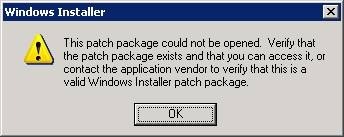
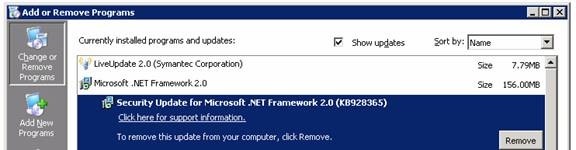
I tried to remove KB928365  security update manually.

clip_image002

Error message when trying to remove KB928365

clip_image003

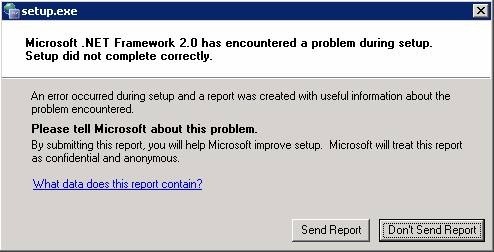
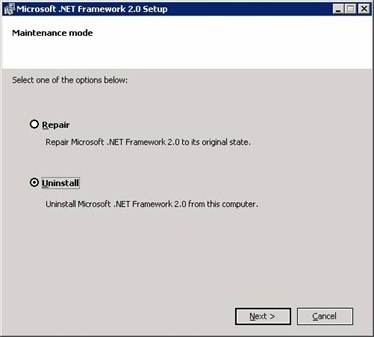
Than I tried to uninstall Microsoft .NET Framework 2.0
clip_image004

clip_image005

Setup end with problem encountered.

clip_image006

So I ended up with corrupt installation of .NET Framework 2.0 and SQL agent was not running. SQL server 2005 run fine.

I googled and found couple of threads at Microsoft newsgroup suggesting to uninstall the installation using a tool “Windows Installer Clean Up”.

I download the bits from http://support.microsoft.com/kb/290301 and installed msicuu2.exe. From Start Menu I run Windows Installer Clean Up shortcut and selected (All Users) Microsoft .NET Framework 2.0 and removed it.
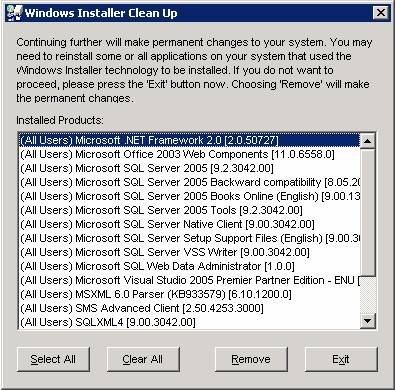
clip_image007

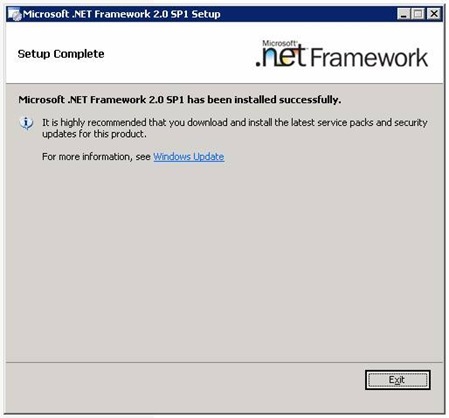
I went back to the Automatic Updates client directory C:\WINDOWS\SoftwareDistribution\Download\Install and rerun NetFx20SP1_x86.exe which now was successful.

clip_image008

The combination of KB928365 and KB110806 resulted in a failed deployment.If this post helped you please support me by clicking on the Google Ads below and let others also be helped by reading this blog. I am already exceeding my monthly bandwidth quota.

51 Responses to “Microsoft .NET Framework 2.0 Service Pack 1 (KB110806) failed”

  1. Thankfulon 10 Jan 2008 at 1:34 am

    Experienced this in a production environment, brought us down for over an hour. If it wasn’t for your post, it would have been two.

    Thanks -

  2. Loganon 23 Jan 2008 at 6:40 pm

    This post was very helpful. Solved my problem immediately. Thanks for taking the time to write it up and post.

    Logan

  3. Philon 24 Jan 2008 at 8:46 pm

    Thank you. When my accounting program would not load or re-install and the 2.0 service pack would not install, I thought I was going to have to spend hours with tech support getting it figured out. You are a life saver.

  4. davidon 25 Jan 2008 at 12:15 am

    thank you so much my friend. using that windows installer cleanup program solved this problem immediately. :D

  5. Danielon 27 Jan 2008 at 12:43 pm

    Thank you from Spain too… Is lucky for us nowadays to have internet and some friendly people that use part of his time sharing problems and solutions :-)

  6. Mikeon 27 Jan 2008 at 9:04 pm

    Thank you so much for this! I was getting a bit perturbed with this until I found your post. Very helpful!

  7. Steveon 28 Jan 2008 at 6:32 pm

    Thanks. This was a good post. A real time saver.

  8. Seanon 29 Jan 2008 at 11:28 am

    I was able to resolve the same issue by going to add/remove programs and instead of uninstalling NET 2.0, I ran the repair option (rather than the unistall option). I restarted the computer with Automatic updates OFF, then switched on Automatic updates and restarted the computer again. The KB 110806 update then installed successfully and I restarted the OS once more to complete the update. (Win XP SP2).

    Unistalling the NET 2.0 would seem to be the safest option, but repairing it may work if you are looking for a quick fix.

  9. Wesleyon 30 Jan 2008 at 12:20 am

    My issue might have been exactly the same as Phil’s: QuickBooks 2008 suddenly stopped working at the same time as Microsoft Automatic Updates tried and failed to install the .NET Framework 2.0 SP1. Of course, trying to uninstall the .NET Framework wouldn’t work, either, nor did System Restore. I was about to waste an entire day wiping our accounting machine clean and reinstalling the OS…

    This tip solved the problem and saved me a bundle of time and hassle. Thanks!

  10. Jameson 03 Feb 2008 at 2:57 am

    I have the same problem when I try to install this update. But with this tutorial a have a good results. Thanks! you are the best!!! ^_^

  11. ocalahearton 03 Feb 2008 at 10:38 pm

    Thanks. This solved the problem. By the way it also worked for a failed .NET 3.0 SP1 install also.

  12. Alejandroon 05 Feb 2008 at 8:42 am

    Thank you very much, I was having a bad time with my PC and this updtae, thanks

  13. Jeannetteon 11 Feb 2008 at 3:33 pm

    Thank u! Thank u! Thank u! I tried to remove .NET Framework 2.0 for nearly 2 days but was not successful. I downloaded the Windows Install Clean up (as per your experience) and VOILA!!!! my problem was solved. Thanx 4 ur help.

  14. Jose Luis Ferreroon 24 Feb 2008 at 5:31 am

    Thanks a lot. It is always a shame not to be able to find easy solutions from microsoft istelf.
    Did what you propossed and worked beautifully.

  15. Marcuson 10 Mar 2008 at 5:14 pm

    fixed most of my problems. Thanks for posting this fix.

  16. Pristason 12 Mar 2008 at 6:02 am

    geneious, absolutely saved me, recomend anyone with this problem to do this solution. very simple to follow, now I can work my AutoCAD2008 and VIZ Recomend this to anyone, bravo!

  17. Carl Whiteon 22 Mar 2008 at 12:55 am

    Thanks. Very helpful. If you are ever in Atlanta, I will buy you a beer, etc.

  18. DFodoron 10 Apr 2008 at 11:24 pm

    I still cannot get Microsoft .NET Frame woek 2.0 Service Pack 1 (KB110806) to install Don

  19. DFodoron 10 Apr 2008 at 11:29 pm

    Microsoft .NET Framework 2.o Service Pack 1 will not install

    DG Fodor

  20. Sherlockon 11 Apr 2008 at 10:30 am

    Thank you very much. This post was very usseful.

  21. Jackieon 12 Apr 2008 at 8:36 pm

    EXCELLENT! many thanks for the work it took to post this!

  22. Sebastianon 13 Apr 2008 at 4:53 am

    Wow, after hours of bad acting as an IT you solved the problem.
    Thank you

  23. Oswaldoon 13 Apr 2008 at 4:07 pm

    THANK YOU VERY MUCH
    I was having problems with Quickbooks and Backup Exec because the .net framework was not working fine, I just followed all the steps here and now everything works fine.
    Again thanks a lot.

  24. Donon 14 Apr 2008 at 10:47 am

    Same Quickbooks problem as everyone else (with .net 2.0 service pack 1).

    But, when trying the fix, I can’t get msicuu2.exe to open, I get an error “active x component can’t create object “scripting.filesystemobject” code 800a01ad
    ms VBScript runtine eror

    tia for any ideas

  25. Donon 14 Apr 2008 at 11:11 am

    ps to above post, you may have figured it out already, I am not an IT pro, but am a somewhat handy with a pc, so, please talk to me in not-too techy terms, thanks in advance
    —is it appropriate to do a smiley here with IT guys? :-)

  26. Jrowon 14 Apr 2008 at 10:12 pm

    I work for a tax software company. Our program depends on .net 2.0. This update wrecked most of our 30,000 customers programs.

    MS - 1
    ME - 0

  27. D Lillyon 15 Apr 2008 at 6:07 am

    Followed your instructions to the “T” and everything is honky dory!!! Thank You!!!

  28. Ted589on 15 Apr 2008 at 12:10 pm

    Had the same problem, and used your method. Worked great. Does anyone know what caused this problem? (The corrupted install that is)

  29. Steve Thompsonon 15 Apr 2008 at 3:59 pm

    Brilliant, I had been trying to install that damned update for 2 days trying different things. Thanks for your help and publishing this fix.

  30. Eric Zon 15 Apr 2008 at 6:08 pm

    Thanks. My computer is working again.

  31. Rebeccaon 15 Apr 2008 at 10:05 pm

    Thank you so much for the post. You’ve saved me hours of lost time and a frustration!

  32. Edwardon 16 Apr 2008 at 9:56 am

    This post was helpful. Thank u.

  33. chetanon 18 Apr 2008 at 12:10 am

    Thanks buddy
    you saved me

  34. Gemaon 18 Apr 2008 at 10:26 pm

    thank you very much, very clear explanation, I have been fighting with .net framework for hours and days

  35. Darrenon 20 Apr 2008 at 3:12 pm

    I was about to send my laptop to a high-dollar repair guy just to get .Net off my computer. This simple repair did the trick. Thank you so much for posting this.

  36. Paulon 21 Apr 2008 at 2:26 pm

    Thank you very much - fixed our issue 1st time.

  37. MEon 26 Apr 2008 at 5:26 pm

    Thanks

  38. eddieon 29 Apr 2008 at 1:32 am

    please tell microsoft about this fix please

  39. Petraon 29 Apr 2008 at 3:41 pm

    Thanks! You’re a real hero. Shame on Microsoft for this terrible mistake.

  40. Johnon 02 May 2008 at 12:02 am

    Thankyou

  41. Priyaon 03 May 2008 at 5:13 am

    Thanks a ton buddy, it resolve the issue in seconds :)

    god bless

  42. Peteron 05 May 2008 at 3:00 pm

    Thanks a lot, you are the man, this make me confidence to have this issue reolved.

  43. Rogeron 16 May 2008 at 5:53 am

    I just downloaded the Windows Installer Cleanup porgram (msicuu2.exe). After I openend it and located the offending Microsoft .Net Framework 2.0 and removed it, my problems were over. The Micrsoft .Net Framework 2.0 Service Pack 1 was waiting for me in the update shield at the bottom of the screen as it had for the past month or so. I clicked on “intall” and it finally loaded. Hurray! And it all seemed so complicated when Microsoft explained it. Thanks for your help.

  44. Sammeyon 23 May 2008 at 11:33 pm

    Finally!!! Been fooling with this for hours/days. Thanks for sharing!!!

    Sam

  45. Ben Griffinon 26 May 2008 at 5:55 pm

    Thanks for all this work and detailed, easy to follow support!! I got the .NET SP1 uninstalled just fine and followed the directions to reinstall. Reinstall from the Windows path shown (D:\Windows\SoftwareDistribution\Download\Install\NetFX20SP1_x86.exe still failed - it appears that a ‘base’ reinstall of .NET 2.0 is required before installing the SP1 patch (?)

  46. Gilberton 09 Jun 2008 at 6:33 am

    OMG. It’s been about a month since this blasted thing first started messing with me. I tried uninstalling and everything else I could think of. Works like a charm now. I am definitely clicking on your adsense site:)

  47. Billon 09 Jun 2008 at 8:04 pm

    Thanks a lot. I have been trying to repair this problem for 2 days, you have really done a service to a lot of people. Much appreciated.

    Bill

  48. Crystalon 10 Jun 2008 at 8:53 pm

    Thank you thank you thank you! I tried so many things and couldn’t get it to work. Tired yours and it worked right away. Thank you!!!

  49. Jeff Horneon 13 Jun 2008 at 6:22 pm

    I have been trying to get my computer to install service pack 3 for two weeks with no success. I noticed that the Microsoft.NET framework service pack 2 and service pack 3 were always trying to install, but for some reason could not. I have been in touch with Microsoft and spent weeks trying to fix the problem to install SP3. The Microsoft representative tried everything, but I was unable to install SP3. I even mentioned to him about the problem with Microsoft.NET install, but he didn’t seem to think this was a problem.

    You solution worked. Thank you!

  50. Barryon 21 Jun 2008 at 8:44 am

    Superb fix. Thanks for taking the time to help all us dorks who would otherwise fall prey to the registry fix charlatans.

  51. Resanaon 14 Jul 2008 at 6:00 pm

    very, very nice… thank you sooooo much

Trackback URI | Comments RSS

Leave a Reply