
 Hi there! Welcome to my blog. My name is Ivan. I am a Dutch IT Professional working as Principal IT Consultant.
 Type the hostname.exe command line to see the current computername which has been generated by the Windows setup. Select the computername and press enter on the keyboard.
</p> <p style="font-size: 11pt; margin: 0in; font-family: Calibri" lang="en-US">c:\Users\Administartor>hostname</p> <p style="font-size: 11pt; margin: 0in; font-family: Calibri" lang="en-US">win2k8-vm</p> <p style="font-size: 11pt; margin: 0in; font-family: Calibri" lang="en-US">
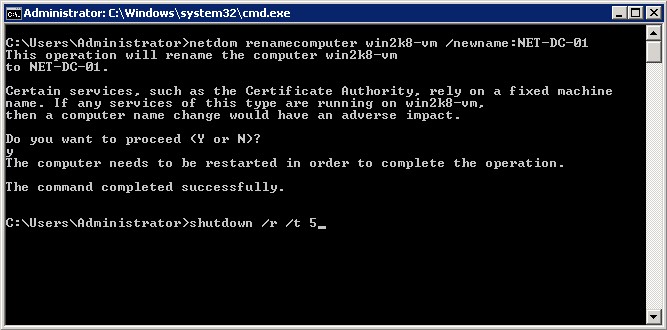
Now we are going to rename the server and prepare it for dcpromo process.
</p> <p style="font-size: 11pt; margin: 0in; font-family: Calibri" lang="en-US">c:\Users\Administartor> netdom renamecomputer win2k8-vm /newname:NET-DC-01</p> <p style="font-size: 11pt; margin: 0in; font-family: Calibri" lang="en-US">Click Y to reboot or enter shutdown /r /t 5</p> <p style="font-size: 11pt; margin: 0in; font-family: Calibri" lang="en-US">


Joshua
Another option is to use the %computername% variable. Then you don’t have to look up the hostname and the only part that changes is the new name you want to name your server:
netdom renamecomputer $computername$ /newname:NET-DC-01
Joshua
sorry, the “$” is a habit. The correct command is:
netdom renamecomputer %computername% /newname:NET-DC-01